

Internal GraphQL Server
この拡張機能は内部GraphQLサーバーをインストールし、PHPコードを使ってアプリケーション内から呼び出すことができます。
主なユースケースとして、何らかのアクションが発生したときにGraphQLクエリの実行をトリガーし、関連するタスク(通知の送信、ログエントリの追加、条件の検証など)を実行することができます。
説明
内部GraphQLサーバーには、クラス GatoGraphQL\InternalGraphQLServer\GraphQLServer を通じてアクセスし、以下の3つのメソッドを使用します。
executeQuery: GraphQLクエリを実行するexecuteQueryInFile: (.gql)ファイルに含まれるGraphQLクエリを実行するexecutePersistedQuery: 永続化されたGraphQLクエリを実行する(IDをint、またはスラッグをstringとして指定)(Persisted Queries 拡張機能が必要)
メソッドのシグネチャは以下の通りです。
namespace GatoGraphQL\InternalGraphQLServer;
use PoP\Root\HttpFoundation\Response;
class GraphQLServer {
/**
* Execute a GraphQL query
*/
public static function executeQuery(
string $query,
array $variables = [],
?string $operationName = null,
int|string|null $schemaConfigurationIDOrSlug = null,
): Response {
// ...
}
/**
* Execute a GraphQL query contained in a (`.gql`) file
*/
public static function executeQueryInFile(
string $file,
array $variables = [],
?string $operationName = null,
int|string|null $schemaConfigurationIDOrSlug = null,
): Response {
// ...
}
/**
* Execute a persisted GraphQL query (providing its object
* of type WP_Post, ID as an int, or slug as a string)
*/
public static function executePersistedQuery(
WP_Post|string|int $persistedQuery,
array $variables = [],
?string $operationName = null
): Response {
// ...
}
}GraphQLクエリを実行してレスポンスの内容を取得するには:
// Provide the GraphQL query
$query = "{ ... }";
// Execute the query against the internal server
$response = GraphQLServer::executeQuery($query);
// Get the content and decode it
$responseContent = json_decode($response->getContent(), true);
// Access the data and errors from the response
$responseData = $responseContent["data"] ?? [];
$responseErrors = $responseContent["errors"] ?? [];Responseオブジェクトには、生成されたヘッダーも含まれます(例:Cache Control Listが適用された場合、Cache-Control ヘッダーが追加されます)。
$responseHeaders = $response->getHeaders();
$responseCacheControlHeader = $response->getHeaderLine('Cache-Control');クラス GraphQLServer は、WordPress コアの init フックより前には使用できないことに注意してください。
スキーマ設定
内部GraphQLサーバーは独自のスキーマ設定を適用します。例えば、デフォルトの設定は設定ページの「Internal GraphQL Server」タブで選択できます。
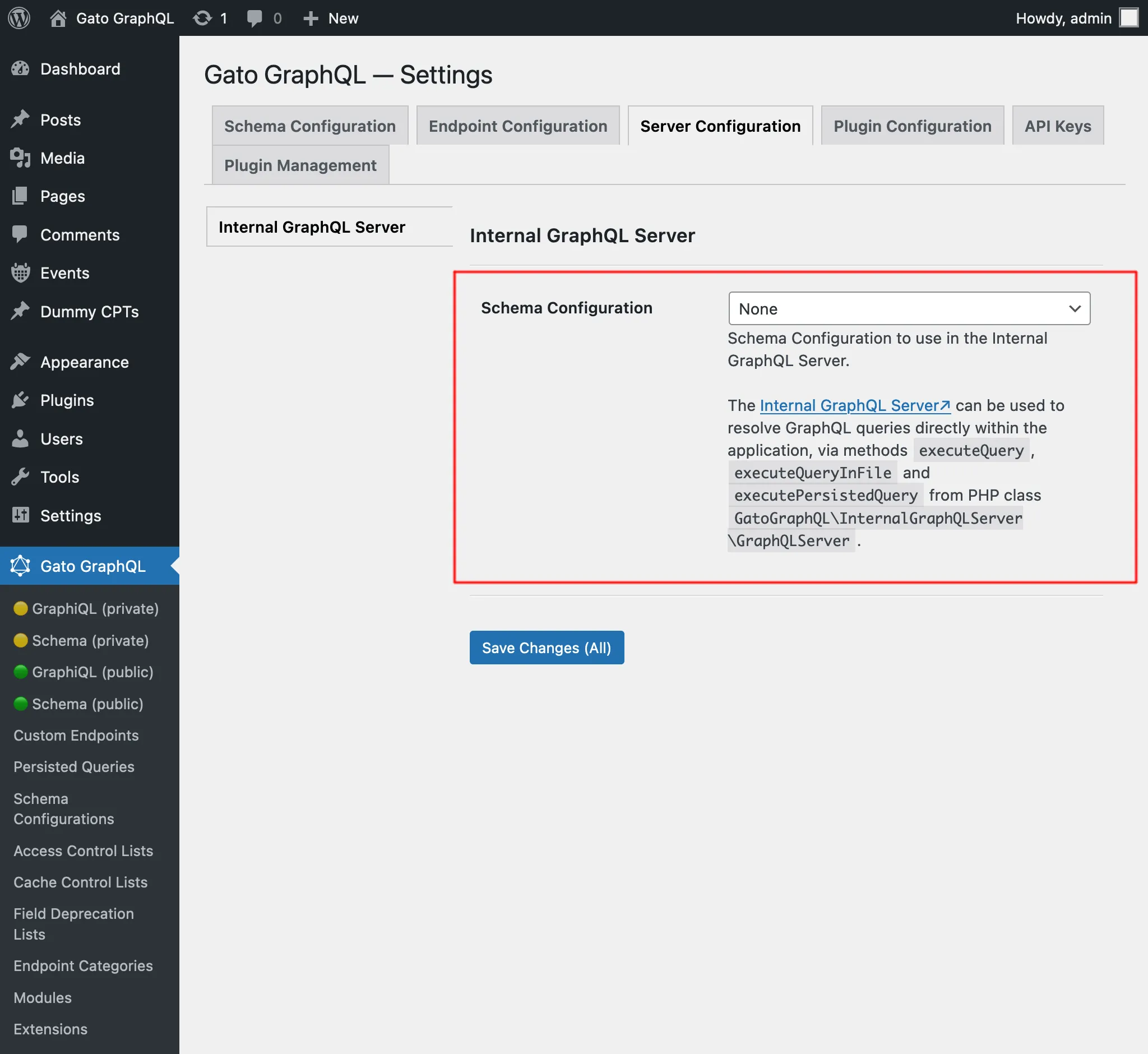
この設定は、内部GraphQLサーバーに対して実行されるクエリが、異なる設定のエンドポイント(公開エンドポイント graphql/ など)で解決中の別のGraphQLクエリによってトリガーされた場合にも適用されます。
例として、シングルエンドポイント graphql/ にIPによるユーザー検証を行うアクセス制御リストを設定し、このエンドポイントに対してミューテーション createPost を実行するとします。
mutation {
createPost(input: {...}) {
# ...
}
}この場合、そのIPからの訪問者のみがこのミューテーションを実行できます。
次に、publish_post にフックを設定して、内部GraphQLサーバーに対してクエリを実行するとします(例:サイト管理者に通知を送信するため)。
add_action(
"publish_post",
fn (int $post_id) => GraphQLServer::executeQuery("...", ["postID" => $post_id])
);このGraphQLクエリは、内部GraphQLサーバーに適用されたスキーマ設定を使用して解決され、シングルエンドポイント graphql/ の設定は使用されません。
その結果、ユーザーIPによる検証は行われません(そのアクセス制御リストが内部GraphQLサーバーにも適用されていない限り)。
問題のデバッグ
クエリの実行を追跡するには、ログを参照してください。
詳細については、問題のトラブルシューティングを確認してください。
例
このワークフロー例(Multiple Query Execution、Helper Function Collection、Field to Input モジュールも使用)では、サイトに新しい投稿が作成されたときに管理者ユーザーに通知を送信します。
WordPress コアのアクション new_to_publish にフックし、新しく作成された投稿のデータを取得して、GraphQLServer::executeQuery を呼び出します。
add_action(
'new_to_publish',
function (WP_Post $post) {
if ($post->post_type !== 'post') {
return;
}
// Check the contents of the query below
$query = ' ... ';
$variables = [
'postTitle' => $post->post_title,
'postContent' => $post->post_content,
]
GraphQLServer::executeQuery($query, $variables, 'SendEmail');
}
);...以下のGraphQLクエリとともに使用します。
query GetEmailData(
$postTitle: String!,
$postContent: String!
) {
emailMessageTemplate: _strConvertMarkdownToHTML(
text: """
There is a new post on the site:
**{$postTitle}**:
{$postContent}
"""
)
emailMessage: _strReplaceMultiple(
search: ["{$postTitle}", "{$postContent}"],
replaceWith: [$postTitle, $postContent],
in: $__emailMessageTemplate
)
@export(as: "emailMessage")
}
mutation SendEmail @depends(on: "GetEmailData") {
_sendEmail(
input: {
to: "admin@site.com"
subject: "There is a new post"
messageAs: {
html: $emailMessage
}
}
) {
status
}
}