

JetEngine CCTS
**CrocoblockのJetEngine**プラグインとの連携です。
GraphQLスキーマには、Custom Content Type(CCT)データをクエリするためのフィールドが提供されます。
ルートフィールド
| フィールド | 説明 |
|---|---|
jetengineCCTEntries | CCTエントリーの一覧を返します(JetEngineCCTEntry型)。 |
jetengineCCTEntryCount | CCTエントリーの件数を返します。 |
jetengineCCTEntry | 単一のCCTエントリーを返します(JetEngineCCTEntry型)。 |
CCTのスラッグはslug引数で指定する必要があります(CCTはプラグインの設定でクエリ可能に設定されている必要があります。以下を参照)。
JetEngineCCTEntryタイプ
JetEngineCCTEntryタイプでは、以下のフィールドを通じてフィールド値をクエリできます。
| フィールド | 説明 |
|---|---|
id | エントリーのデータベースID。 |
uniqueID | CCTスラッグとエントリーIDで構成される、エントリーの一意な識別子。 |
cctSlug | このエントリーが属するCCTのスラッグ。 |
status | エントリーのステータス(例:publish、draft)。 |
createdDate | エントリーが作成された日時。 |
createdDateStr | エントリーの作成日時を文字列としてフォーマットしたもの。 |
modifiedDate | エントリーが最後に更新された日時。 |
modifiedDateStr | エントリーの最終更新日時を文字列としてフォーマットしたもの。 |
authorID | エントリー作成者のID。 |
author | 作成者ユーザーの接続オブジェクト。 |
singleCustomPostID | リンクされた単一カスタム投稿のID(存在する場合)。 |
singleCustomPost | リンクされた単一カスタム投稿の接続オブジェクト。 |
fieldValues | そのエントリーのすべてのCCTフィールドを含むJSONオブジェクト。 |
fieldValue(slug) | スラッグで単一フィールドをクエリするためのフィールド。 |
CCTフィールド値
fieldValue(slug)およびfieldValuesの各キーの値は、CCTで定義されたフィールドタイプに従ってキャストされます。
暗黙のIDフィールド(存在し空でない場合は常にintにキャスト):id、singleCustomPostID、authorID。
各CCTフィールドタイプがGraphQLレスポンスでどのようにキャストされるか:
float、それ以外はint。1、true、yes、on(大文字・小文字を区別しない)の場合はtrue。int;「Both」→ オブジェクト { id, url };それ以外は変換なし。int[]。int;複数 → int[]。以下の例では、スラッグ"sample_cct"のCCTと、異なるタイプのフィールド(text、number、galleryなど)を使用しています。
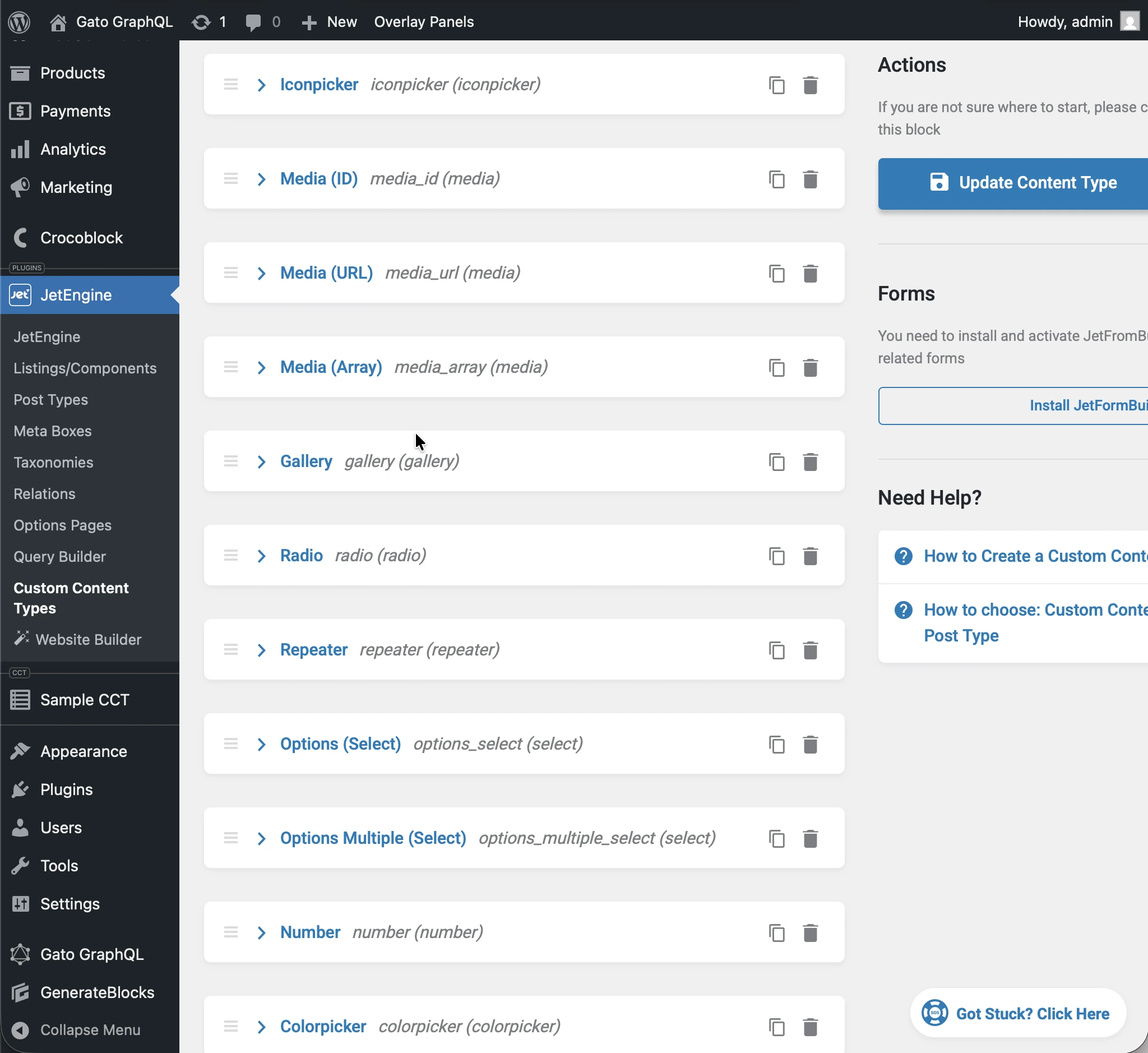
次のクエリを実行すると:
query JetEngineCCTEntries {
jetengineCCTEntry(cctSlug: "sample_cct", by: { id: 1 }) {
label_text: fieldValue(slug: "label_text")
textarea: fieldValue(slug: "textarea")
date: fieldValue(slug: "date")
time: fieldValue(slug: "time")
datetime: fieldValue(slug: "datetime")
wysisyg: fieldValue(slug: "wysisyg")
switcher: fieldValue(slug: "switcher")
checkbox: fieldValue(slug: "checkbox")
checkbox_array: fieldValue(slug: "checkbox_array")
iconpicker: fieldValue(slug: "iconpicker")
media_id: fieldValue(slug: "media_id")
media_url: fieldValue(slug: "media_url")
media_array: fieldValue(slug: "media_array")
gallery: fieldValue(slug: "gallery")
radio: fieldValue(slug: "radio")
repeater: fieldValue(slug: "repeater")
options_select: fieldValue(slug: "options_select")
options_multiple_select: fieldValue(slug: "options_multiple_select")
number: fieldValue(slug: "number")
colorpicker: fieldValue(slug: "colorpicker")
post: fieldValue(slug: "post")
posts: fieldValue(slug: "posts")
}
}...レスポンスの各フィールドはそのCCTタイプにキャストされます:
{
"data": {
"jetengineCCTEntry": {
"label_text": "Some label",
"textarea": "Some description here\r\n\r\nSome description there",
"date": "2026-01-24",
"time": "09:13",
"datetime": "2026-03-07T08:00",
"wysisyg": "<p>Some <strong>description</strong> here</p>\n<p><em>Some description</em> there</p>\n<p>Some <a href=\"https://gatoplugins.com\">link</a></p>\n",
"switcher": true,
"checkbox": {
"one": true,
"two": false,
"three": true
},
"checkbox_array": [
"one",
"two"
],
"iconpicker": "fa fa-road",
"media_id": 1362,
"media_url": "https://gatographql.com/wp-content/uploads/GatoGraphQL-logo.webp",
"media_array": {
"id": 1380,
"url": "https://gatographql.com/wp-content/uploads/Funny-Dog.jpg"
},
"gallery": [
1361,
1362,
1363
],
"radio": "1",
"repeater": [
{
"label_(text)": "First item in repeater",
"date": "2026-01-17",
"time": "11:00",
"datetime": "2026-01-16T11:16",
"textarea": "Gato GraphQL provides a multitude of interactive clients,",
"wysiwyg": "<p>Gato GraphQL provides a <strong>multitude of interactive clients</strong>, and a user interface based on the <a href=\"https://wordpress.org\">WordPress editor</a>, so that anybody can operate it, whether a developer or not.</p>\n",
"switcher": true,
"iconpicker": "fa fa-inbox",
"media_id": 1361,
"media_url": "https://gatographql.com/wp-content/uploads/Funny-Dog.jpg",
"media_array": {
"id": 1380,
"url": "https://gatographql.com/wp-content/uploads/Funny-Dog.jpg"
},
"gallery": [
1363,
1361
],
"radio": "two",
"options_select": "three",
"options_multiple_select": [
"two",
"four"
],
"number": 22,
"colorpicker": "#757575",
"post": 1140,
"posts": [
1,
2
]
},
{
"label_(text)": "Second item in repeater",
"date": "2026-01-15",
"time": "00:18",
"datetime": "2026-01-18T00:00",
"textarea": "These clients make it very easy to interact with Gato GraphQL",
"wysiwyg": "<p>These clients <strong>make it very easy to interact with Gato GraphQL</strong>, directly within the <em>wp-admin</em> (and without the need of any PHP code), reducing friction and removing barriers so that anyone (developers and non-developers alike) can use it.</p>\n",
"switcher": false,
"iconpicker": "fa fa-search-plus",
"media_id": 1362,
"media_url": "https://gatographql.com/wp-content/uploads/LICENSE.txt",
"media_array": {
"id": 1363,
"url": "https://gatographql.com/wp-content/uploads/LICENSE.txt"
},
"gallery": [
1380,
1361,
1362
],
"radio": "three",
"options_select": "three",
"options_multiple_select": [
"three"
],
"number": 4469,
"colorpicker": "#2d2270",
"post": 2,
"posts": [
1688,
1682
]
}
],
"options_select": "1",
"options_multiple_select": [
"one",
"two",
"five"
],
"number": 66778899,
"colorpicker": "#721abf",
"post": 1,
"posts": [
1140,
1113
]
}
}
}fieldValuesが返すJSONの各フィールドにも同じタイプキャストが適用されます:
query JetEngineCCTEntries {
jetengineCCTEntry(cctSlug: "sample_cct", by: { id: 1 }) {
fieldValues
}
}...これは以下を返します:
{
"data": {
"jetengineCCTEntry": {
"fieldValues": {
"label_text": "Some label",
"textarea": "Some description here\r\n\r\nSome description there",
"date": "2026-01-24",
"time": "09:13",
"datetime": "2026-03-07T08:00",
"wysisyg": "<p>Some <strong>description</strong> here</p>\n<p><em>Some description</em> there</p>\n<p>Some <a href=\"https://gatoplugins.com\">link</a></p>\n",
"switcher": true,
"checkbox": {
"one": true,
"two": false,
"three": true
},
"checkbox_array": [
"one",
"two"
],
"iconpicker": "fa fa-road",
"media_id": 1362,
"media_url": "https://gatographql.com/wp-content/uploads/GatoGraphQL-logo.webp",
"media_array": {
"id": 1380,
"url": "https://gatographql.com/wp-content/uploads/Funny-Dog.jpg"
},
"gallery": [
1361,
1362,
1363
],
"radio": "1",
"repeater": [
{
"label_(text)": "First item in repeater",
"date": "2026-01-17",
"time": "11:00",
"datetime": "2026-01-16T11:16",
"textarea": "Gato GraphQL provides a multitude of interactive clients,",
"wysiwyg": "<p>Gato GraphQL provides a <strong>multitude of interactive clients</strong>, and a user interface based on the <a href=\"https://wordpress.org\">WordPress editor</a>, so that anybody can operate it, whether a developer or not.</p>\n",
"switcher": true,
"iconpicker": "fa fa-inbox",
"media_id": 1361,
"media_url": "https://gatographql.com/wp-content/uploads/Funny-Dog.jpg",
"media_array": {
"id": 1380,
"url": "https://gatographql.com/wp-content/uploads/Funny-Dog.jpg"
},
"gallery": [
1363,
1361
],
"radio": "two",
"options_select": "three",
"options_multiple_select": [
"two",
"four"
],
"number": 22,
"colorpicker": "#757575",
"post": 1140,
"posts": [
1,
2
]
},
{
"label_(text)": "Second item in repeater",
"date": "2026-01-15",
"time": "00:18",
"datetime": "2026-01-18T00:00",
"textarea": "These clients make it very easy to interact with Gato GraphQL",
"wysiwyg": "<p>These clients <strong>make it very easy to interact with Gato GraphQL</strong>, directly within the <em>wp-admin</em> (and without the need of any PHP code), reducing friction and removing barriers so that anyone (developers and non-developers alike) can use it.</p>\n",
"switcher": false,
"iconpicker": "fa fa-search-plus",
"media_id": 1362,
"media_url": "https://gatographql.com/wp-content/uploads/LICENSE.txt",
"media_array": {
"id": 1363,
"url": "https://gatographql.com/wp-content/uploads/LICENSE.txt"
},
"gallery": [
1380,
1361,
1362
],
"radio": "three",
"options_select": "three",
"options_multiple_select": [
"three"
],
"number": 4469,
"colorpicker": "#2d2270",
"post": 2,
"posts": [
1688,
1682
]
}
],
"options_select": "1",
"options_multiple_select": [
"one",
"two",
"five"
],
"number": 66778899,
"colorpicker": "#721abf",
"post": 1,
"posts": [
1140,
1113
]
}
}
}
}CCTへのアクセス許可
デフォルトでは、クエリ可能なCCTはありません。
CCTへのアクセスを許可するには、プラグインの設定でCCTをクエリ可能に設定する必要があります。
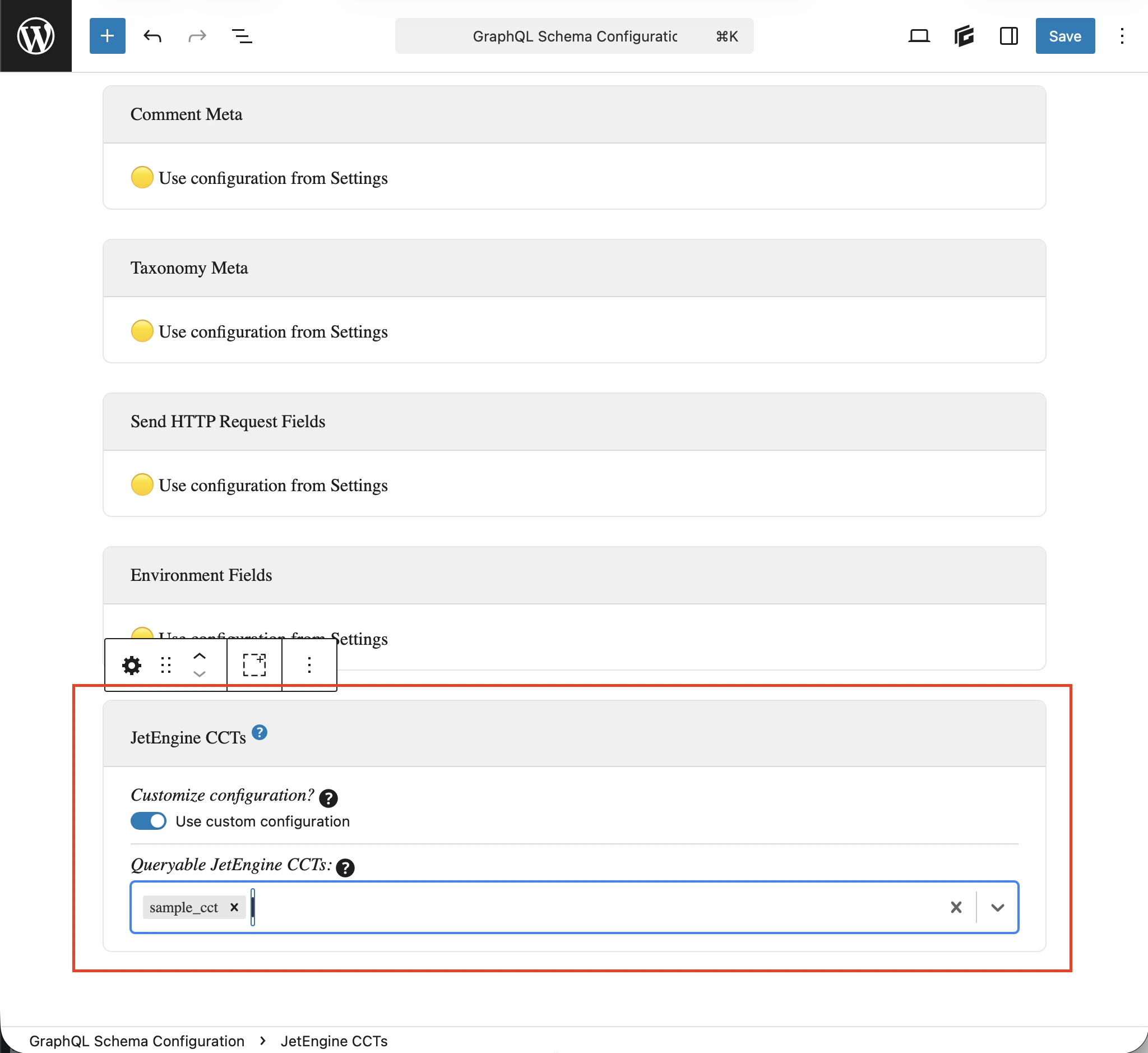
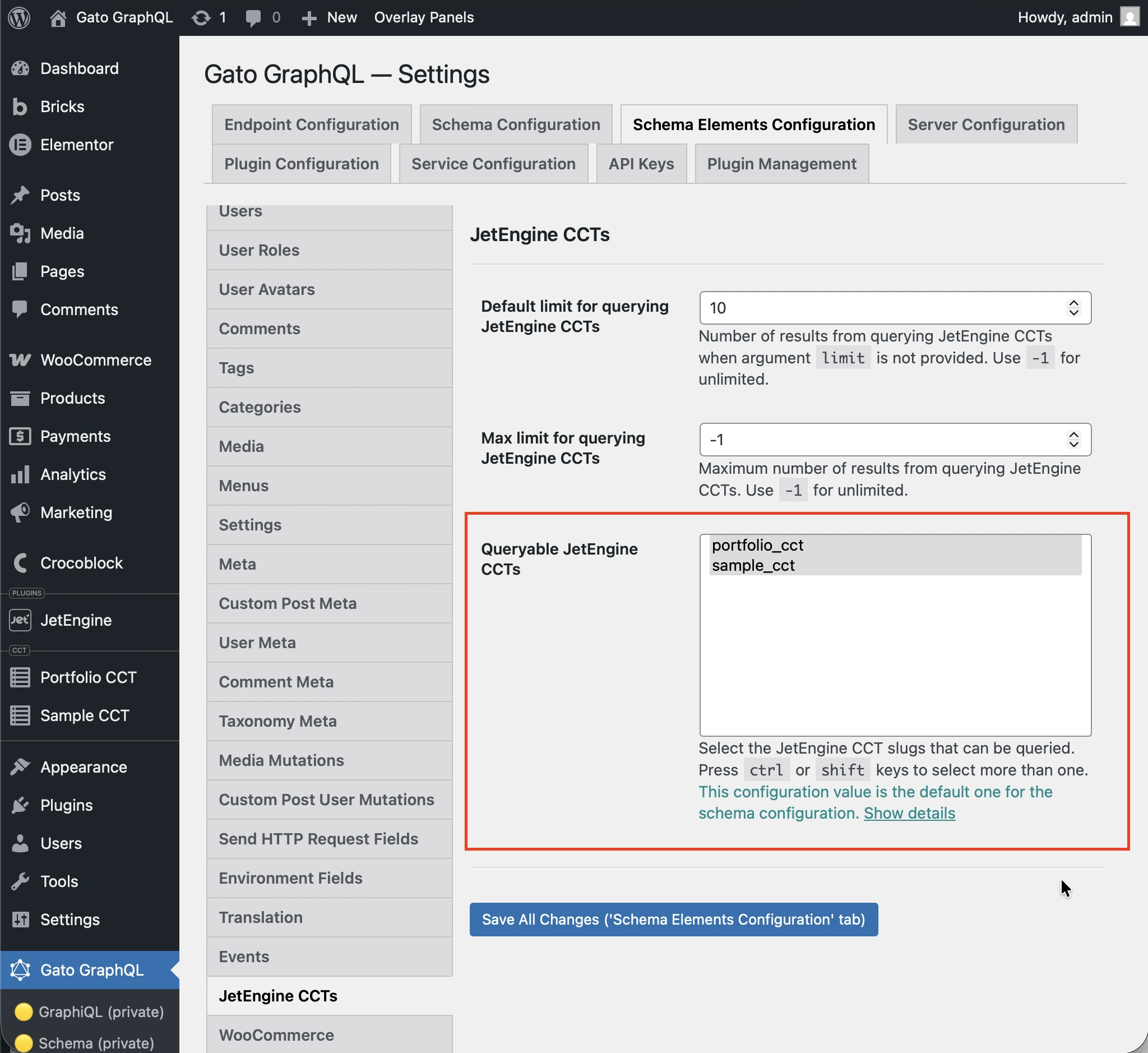
この設定を行える場所は、優先度順に2箇所あります:
- カスタム:対応するスキーマ設定内
- 全般:設定ページ内
エンドポイントに適用されているスキーマ設定で、カスタム設定を使用オプションを選択し、希望するエントリーを入力してください:
それ以外の場合は、設定のJetEngine CCTSセクション配下にあるQueryable JetEngine CCTSオプションで定義されたエントリーが使用されます:
クエリ例
CCTエントリーの一覧:
query {
jetengineCCTEntries(cctSlug: "sample_cct") {
id
uniqueID
cctSlug
status
createdDate
modifiedDate
authorID
author {
id
name
}
singleCustomPostID
singleCustomPost {
id
title
}
fieldValues
someField: fieldValue(slug: "some_field_slug")
}
}スラッグとIDによる単一CCTエントリー:
query {
jetengineCCTEntry(cctSlug: "sample_cct", by: { id: 1 }) {
id
uniqueID
cctSlug
status
createdDate
modifiedDate
author {
id
name
}
singleCustomPost {
id
title
}
fieldValues
someField: fieldValue(slug: "some_field_slug")
}
}フィルター、ページネーション、ソートを使ったCCTエントリーの一覧とカウント:
query {
jetengineCCTEntryCount(
cctSlug: "sample_cct"
filter: { search: [{ field: "cct_author_id", value: 1, operator: EQUALS }] }
)
jetengineCCTEntries(
cctSlug: "sample_cct"
filter: { search: [{ field: "cct_author_id", value: 1, operator: EQUALS }] }
pagination: { limit: 10, offset: 0 }
sort: { by: "cct_created", order: DESC }
) {
id
authorID
}
}