

HTTP クライアント
ウェブサーバーに対してHTTPリクエストを実行し、レスポンスを取得するフィールドをGraphQLスキーマに追加します:
_sendJSONObjectItemHTTPRequest_sendJSONObjectItemHTTPRequests_sendJSONObjectCollectionHTTPRequest_sendJSONObjectCollectionHTTPRequests_sendHTTPRequest_sendHTTPRequests_sendGraphQLHTTPRequest_sendGraphQLHTTPRequests
セキュリティ上の理由から、接続可能なURLは明示的に設定する必要があります。
フィールド一覧
以下のフィールドがスキーマに追加されます。
_sendJSONObjectItemHTTPRequest
単一のJSONオブジェクトの(REST)レスポンスを取得します。
シグネチャ: _sendJSONObjectItemHTTPRequest(input: HTTPRequestInput!): JSONObject.
_sendJSONObjectItemHTTPRequests
複数のエンドポイントから単一のJSONオブジェクトの(REST)レスポンスを取得します。非同期(並列)または同期(順番に)で実行されます。
シグネチャ: _sendJSONObjectItemHTTPRequests(async: Boolean = true, inputs: [HTTPRequestInput!]!): [JSONObject].
_sendJSONObjectCollectionHTTPRequest
JSONオブジェクトのコレクションの(REST)レスポンスを取得します。
シグネチャ: _sendJSONObjectCollectionHTTPRequest(input: HTTPRequestInput!): [JSONObject].
_sendJSONObjectCollectionHTTPRequests
複数のエンドポイントからJSONオブジェクトのコレクションの(REST)レスポンスを取得します。非同期(並列)または同期(順番に)で実行されます。
シグネチャ: _sendJSONObjectCollectionHTTPRequests(async: Boolean = true, inputs: [HTTPRequestInput!]!): [[JSONObject]].
_sendHTTPRequest
指定されたURLに接続し、以下のフィールドを含むHTTPResponseオブジェクトを取得します:
statusCode: Int!contentType: String!body: String!headers: JSONObject!header(name: String!): StringhasHeader(name: String!): Boolean!
シグネチャ: _sendHTTPRequest(input: HTTPRequestInput!): HTTPResponse.
_sendHTTPRequests
_sendHTTPRequestに似ていますが、複数のURLを受け取り、非同期(並列)で接続することができます。
シグネチャ: _sendHTTPRequests(async: Boolean = true, inputs: [HTTPRequestInput!]!): [HTTPResponse].
_sendGraphQLHTTPRequest
指定されたエンドポイントに対してGraphQLクエリを実行し、レスポンスをJSONオブジェクトとして取得します。
このフィールドへの入力は、GraphQLに必要なデータ(エンドポイント、GraphQLクエリ、変数、オペレーション名)を受け付け、デフォルトのメソッド(POST)とコンテントタイプ(application/json)がすでに設定されています。
シグネチャ: _sendGraphQLHTTPRequest(input: GraphQLRequestInput!): JSONObject.
_sendGraphQLHTTPRequests
_sendGraphQLHTTPRequestsに似ていますが、複数のGraphQLクエリを並行して実行します。非同期(並列)または同期(順番に)で実行できます。
シグネチャ: _sendGraphQLHTTPRequests(async: Boolean = true, inputs: [GraphQLRequestInput!]!): JSONObject.
許可URLの設定
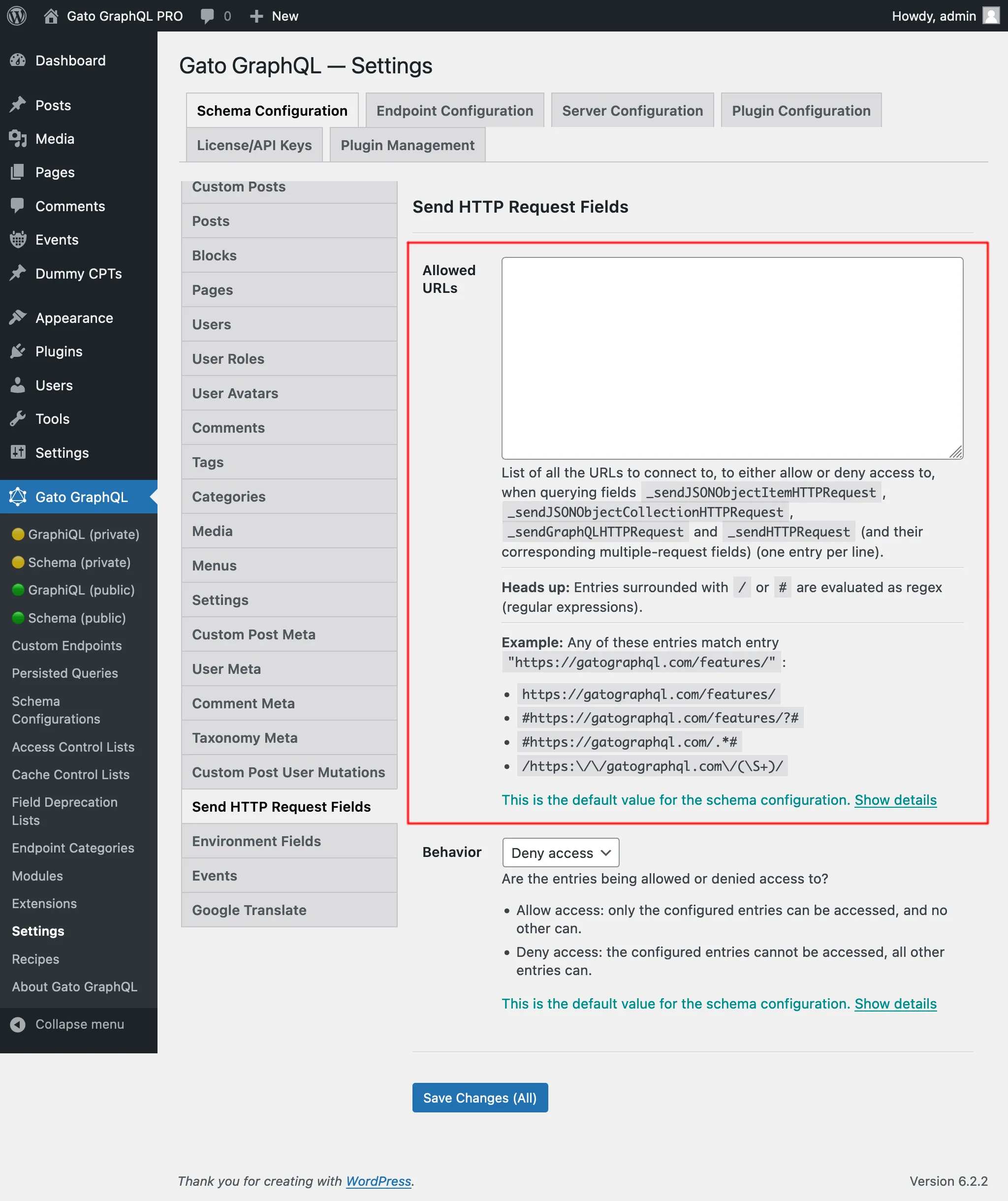
接続可能なURLのリストを設定する必要があります。
各エントリは以下のいずれかです:
/または#で囲まれている場合は、正規表現(regex)- それ以外の場合は、完全なURL
例えば、以下のエントリはいずれもURL "https://gatographql.com/recipes/" に一致します:
https://gatographql.com/recipes/#https://gatographql.com/recipes/?##https://gatographql.com/.*#/https:\\/\\/gatographql.com\\/(\S+)/
この設定は、優先順位の高い順に2箇所で行うことができます:
- カスタム:対応するスキーマ設定で
- 一般:設定ページで
エンドポイントに適用されるスキーマ設定で、オプション "Use custom configuration" を選択し、希望するエントリを入力します:
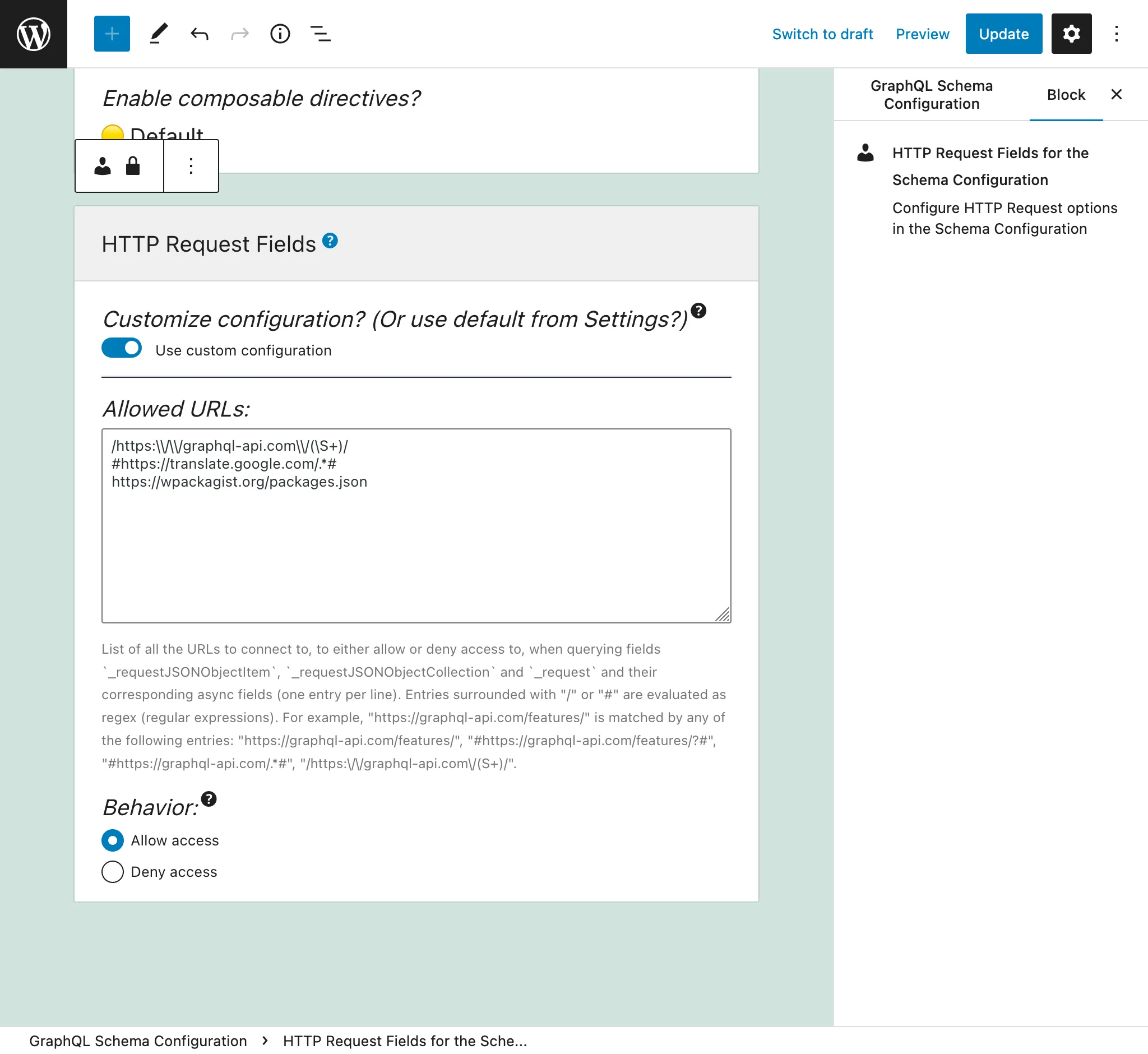
それ以外の場合は、設定の「Send HTTP Request Fields」タブで定義されたエントリが使用されます:
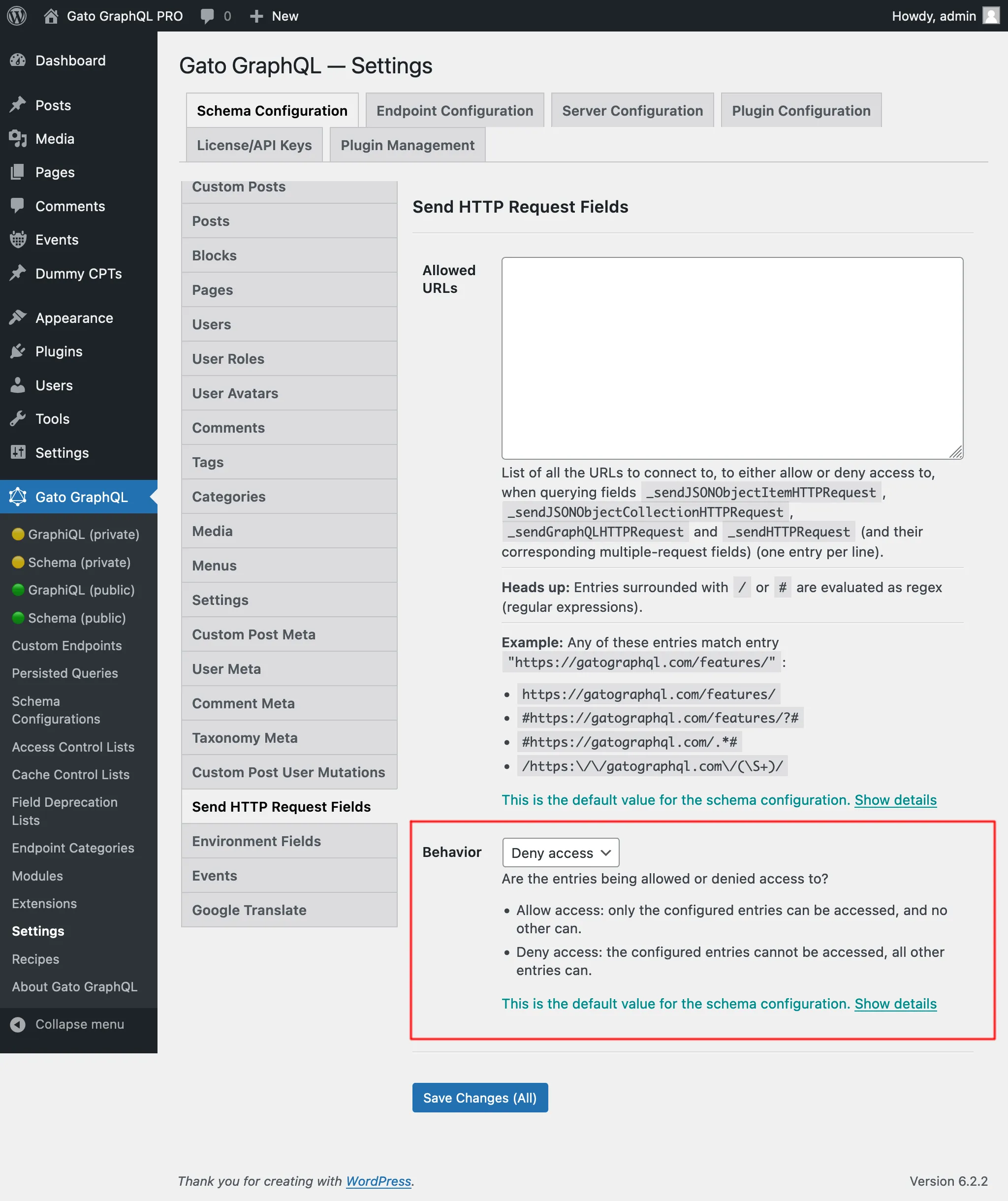
「アクセスを許可」と「アクセスを拒否」の2つの動作があります:
- アクセスを許可: 設定されたエントリのみアクセス可能で、それ以外はアクセスできません
- アクセスを拒否: 設定されたエントリにはアクセスできず、それ以外のすべてのエントリはアクセス可能です
内部URLへのアクセスに必要な権限
一部のURLは内部アドレス(127.0.0.1、リンクローカル範囲、クラウドメタデータエンドポイントなど)に解決され、到達された場合に内部サービスが公開される可能性があります。この設定は、設定ページの Plugin Configuration > HTTP Client で構成されます。
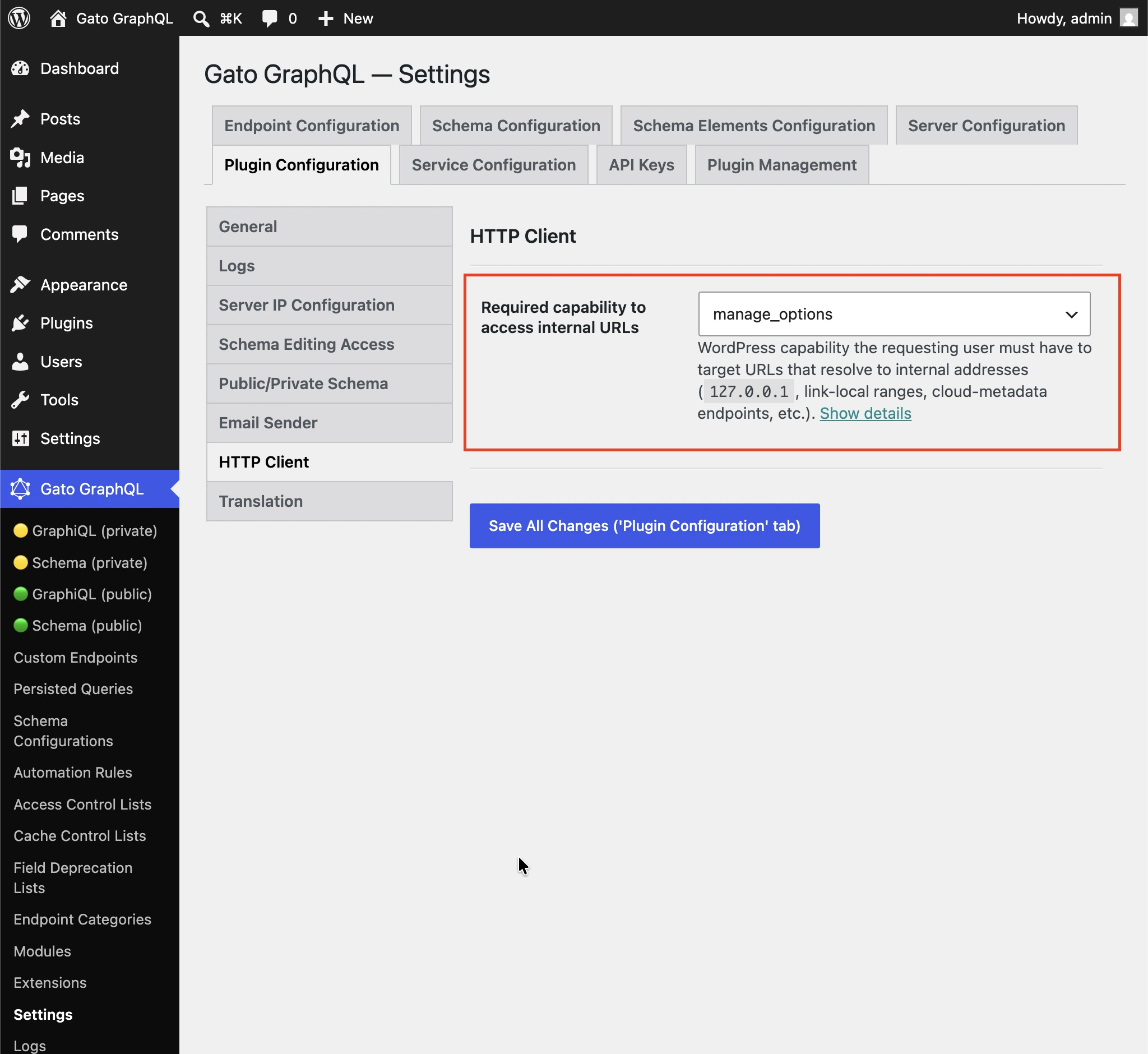
内部アドレス(127.0.0.1、リンクローカル範囲、クラウドメタデータエンドポイントなど)に解決されるURLをターゲットにするために、リクエストユーザーが持つ必要があるWordPress権限です。
非管理者ユーザーがHTTPクライアントフィールドを通じて内部サービスに到達できないよう、デフォルトは manage_options に設定されています。
権限チェックを無効にするには、(ログイン済みの任意のユーザー) を選択します。
各フィールドの使い分け
すべてのフィールドは似ていますが、それぞれ異なります。
_sendJSONObjectItemHTTPRequest
このフィールドは1つのJSONオブジェクト項目を取得します。WP REST APIエンドポイント /wp-json/wp/v2/posts/1/ のようなRESTエンドポイントから単一の項目をクエリする場合に便利です。
このクエリ:
{
postData: _sendJSONObjectItemHTTPRequest(input: { url: "https://newapi.getpop.org/wp-json/wp/v2/posts/1/" } )
}...は以下のレスポンスを取得します:
{
"data": {
"postData": {
"id": 1,
"date": "2019-08-02T07:53:57",
"date_gmt": "2019-08-02T07:53:57",
"guid": {
"rendered": "https:\/\/newapi.getpop.org\/?p=1"
},
"modified": "2021-01-14T13:18:39",
"modified_gmt": "2021-01-14T13:18:39",
"slug": "hello-world",
"status": "publish",
"type": "post",
"link": "https:\/\/newapi.getpop.org\/uncategorized\/hello-world\/",
"title": {
"rendered": "Hello world!"
},
"content": {
"rendered": "\n<p>Welcome to WordPress. This is your first post. Edit or delete it, then start writing!<\/p>\n\n\n\n<p>I’m demonstrating a Youtube video:<\/p>\n\n\n\n<figure class=\"wp-block-embed is-type-video is-provider-youtube wp-block-embed-youtube wp-embed-aspect-16-9 wp-has-aspect-ratio\"><div class=\"wp-block-embed__wrapper\">\n<iframe loading=\"lazy\" title=\"Introduction to the Component-based API by Leonardo Losoviz | JSConf.Asia 2019\" width=\"750\" height=\"422\" src=\"https:\/\/www.youtube.com\/embed\/9pT-q0SSYow?feature=oembed\" frameborder=\"0\" allow=\"accelerometer; autoplay; clipboard-write; encrypted-media; gyroscope; picture-in-picture\" allowfullscreen><\/iframe>\n<\/div><figcaption>This is my presentation in JSConf Asia 2019<\/figcaption><\/figure>\n",
"protected": false
},
"excerpt": {
"rendered": "<p>Welcome to WordPress. This is your first post. Edit or delete it, then start writing! I’m demonstrating a Youtube video:<\/p>\n",
"protected": false
},
"author": 1,
"featured_media": 0,
"comment_status": "closed",
"ping_status": "open",
"sticky": false,
"template": "",
"format": "standard",
"meta": [],
"categories": [
1
],
"tags": [
193,
173
]
}
}
}_sendJSONObjectCollectionHTTPRequest
このフィールドは_sendJSONObjectItemHTTPRequestに似ていますが、WP REST APIエンドポイント /wp-json/wp/v2/posts/ のようなJSONオブジェクトのコレクションを取得します。
このクエリ:
{
postData: _sendJSONObjectItemHTTPRequest(input: { url: "https://newapi.getpop.org/wp-json/wp/v2/posts/?per_page=3&_fields=id,type,title,date" } )
}...は以下のレスポンスを取得します:
{
"data": {
"postData": [
{
"id": 1692,
"date": "2022-04-26T10:10:08",
"type": "post",
"title": {
"rendered": "My Blogroll"
}
},
{
"id": 1657,
"date": "2020-12-21T08:24:18",
"type": "post",
"title": {
"rendered": "A tale of two cities – teaser"
}
},
{
"id": 1499,
"date": "2019-08-08T02:49:36",
"type": "post",
"title": {
"rendered": "COPE with WordPress: Post demo containing plenty of blocks"
}
}
]
}
}_sendHTTPRequest
このフィールドはレスポンスのすべてのプロパティを含むHTTPResponseオブジェクトを取得します。これにより、ボディ(String型、つまりJSONとしてキャストされません)、ステータスコード、コンテントタイプ、ヘッダーを個別にクエリできます。
例えば、以下のクエリ:
{
_sendHTTPRequest(
input: {
url: "https://newapi.getpop.org/wp-json/wp/v2/comments/11/?_fields=id,date,content"
}
) {
statusCode
contentType
headers
body
contentLengthHeader: header(name: "Content-Length")
cacheControlHeader: header(name: "Cache-Control")
}
}...は以下のレスポンスを返します:
{
"data": {
"_sendHTTPRequest": {
"statusCode": 200,
"contentType": "application\/json; charset=UTF-8",
"headers": {
"Access-Control-Allow-Headers": "Authorization, X-WP-Nonce, Content-Disposition, Content-MD5, Content-Type",
"Access-Control-Expose-Headers": "X-WP-Total, X-WP-TotalPages, Link",
"Allow": "GET",
"Cache-Control": "max-age=300,no-store",
"Content-Length": "508"
},
"body": "{\"id\":11,\"date\":\"2020-12-12T04:09:36\",\"content\":{\"rendered\":\"<p>Wow, this sounds awesome!<\\\/p>\\n\"},\"_links\":{\"self\":[{\"href\":\"https:\\\/\\\/newapi.getpop.org\\\/wp-json\\\/wp\\\/v2\\\/comments\\\/11\"}],\"collection\":[{\"href\":\"https:\\\/\\\/newapi.getpop.org\\\/wp-json\\\/wp\\\/v2\\\/comments\"}],\"author\":[{\"embeddable\":true,\"href\":\"https:\\\/\\\/newapi.getpop.org\\\/wp-json\\\/wp\\\/v2\\\/users\\\/3\"}],\"up\":[{\"embeddable\":true,\"post_type\":\"post\",\"href\":\"https:\\\/\\\/newapi.getpop.org\\\/wp-json\\\/wp\\\/v2\\\/posts\\\/28\"}]}}",
"contentLengthHeader": "508",
"cacheControlHeader": "max-age=300,no-store"
}
}
}_sendGraphQLHTTPRequest
以下のクエリを実行すると:
{
graphQLRequest: _sendGraphQLHTTPRequest(
input: {
endpoint: "https://newapi.getpop.org/api/graphql/"
query: """
query GetPosts($postIDs: [ID]!) {
posts(filter: { ids: $postIDs }) {
id
title
}
}
"""
variables: [
{
name: "postIDs",
value: [1, 1499]
}
]
}
)
}...以下のレスポンスが返されます:
{
"data": {
"graphQLRequest": {
"data": {
"posts": [
{
"id": 1499,
"title": "COPE with WordPress: Post demo containing plenty of blocks"
},
{
"id": 1,
"title": "Hello world!"
}
]
}
}
}
}複数リクエストフィールド:_sendJSONObjectItemHTTPRequests、_sendJSONObjectCollectionHTTPRequests、_sendGraphQLHTTPRequests、_sendHTTPRequests
これらのフィールドは対応する単一フィールドと同様に動作しますが、複数のエンドポイントから一度にデータを取得します。非同期(並列)または同期(順番に)で実行できます。レスポンスはリストに格納され、urlsパラメータでURLが定義された順序と同じ順序になります。
例えば、以下のクエリ:
{
weatherForecasts: _sendJSONObjectItemHTTPRequests(
urls: [
"https://api.weather.gov/gridpoints/TOP/31,80/forecast",
"https://api.weather.gov/gridpoints/TOP/41,55/forecast"
]
)
}...は以下のレスポンスを生成します:
{
"data": {
"weatherForecasts": [
{
"type": "Feature",
"geometry": {
"type": "Polygon",
"coordinates": [
[
[
-97.1089731,
39.766826299999998
],
[
-97.108526900000001,
39.744778799999999
]
]
]
},
"properties": {
"updated": "2022-03-04T09:39:46+00:00",
"units": "us",
"forecastGenerator": "BaselineForecastGenerator",
"generatedAt": "2022-03-04T10:31:47+00:00",
"updateTime": "2022-03-04T09:39:46+00:00",
"validTimes": "2022-03-04T03:00:00+00:00/P7DT22H",
"elevation": {
"unitCode": "wmoUnit:m",
"value": 441.95999999999998
}
}
},
{
"type": "Feature",
"geometry": {
"type": "Polygon",
"coordinates": [
[
[
-96.812529900000001,
39.218048000000003
],
[
-96.812148500000006,
39.195940300000004
]
]
]
},
"properties": {
"updated": "2022-03-04T09:39:46+00:00",
"units": "us",
"forecastGenerator": "BaselineForecastGenerator",
"generatedAt": "2022-03-04T10:42:26+00:00",
"updateTime": "2022-03-04T09:39:46+00:00",
"validTimes": "2022-03-04T03:00:00+00:00/P7DT22H",
"elevation": {
"unitCode": "wmoUnit:m",
"value": 409.04160000000002
}
}
}
]
}
}同期実行と非同期実行
以下のフィールドにより、複数のリクエストを実行できます:
_sendHTTPRequests_sendJSONObjectItemHTTPRequests_sendJSONObjectCollectionHTTPRequests_sendGraphQLHTTPRequests
これらのフィールドは入力$asyncを受け取り、リクエストを同期($async => false)または非同期で実行するかどうかを定義します。
同期実行
HTTPリクエストは順番に実行され、各リクエストは前のリクエストが解決された直後に実行されます。
すべてのHTTPリクエストが成功した場合、フィールドは入力リストに表示された順序と同じ順序でレスポンスの配列を出力します。
いずれかのHTTPリクエストが失敗した場合、実行はその時点で停止します。つまり、入力リスト内の後続のHTTPリクエストは実行されません。
HTTPリクエストが失敗する可能性のある原因には以下があります:
- 接続先のサーバーがオフライン
- レスポンスのステータスコードが200でない:500内部エラー、404見つからない、403禁止など
- レスポンスのコンテントタイプが
application/jsonでない
(後者の2つは、JSON型のみを処理することを期待する_sendJSONObjectItemHTTPRequests、_sendJSONObjectCollectionHTTPRequests、_sendGraphQLHTTPRequestsではエラーとして扱われますが、特定の形式を前提としない_sendHTTPRequestsでは扱われません。)
エラーの場合、フィールドはnullを返します(つまり、以前の成功したHTTPリクエストのレスポンスは出力されません)。エラーエントリには、失敗した入力リストの項目を示す(0から始まる)拡張フィールドhttpRequestInputArrayPositionが含まれます:
{
"errors": [
{
"message": "Server error: `GET https:\/\/mysite.com\/page-triggering-some-500-error` resulted in a `500 Internal Server Error` response",
"extensions": {
"httpRequestInputArrayPosition": 0,
"field": "_sendJSONObjectItemHTTPRequests(async: false, inputs: [{url: \"https:\/\/mysite.com\/page-triggering-some-500-error\"}, {url: \"https:\/\/mysite.com\/wp-json\/wp\/v2\/posts\/1\/\"}, {url: \"https:\/\/mysite.com\/wp-json\/wp\/v2\/users\/1\/\"}])"
}
}
],
"data": {
"_sendJSONObjectItemHTTPRequests": null
}
}非同期実行
すべてのHTTPリクエストは並行して(つまり並列で)実行され、どの順序でHTTPリクエストが解決されるかは不明です。
すべてのHTTPリクエストが成功した場合、フィールドは入力リストに表示された順序と同じ順序でレスポンスの配列を出力します。
いずれかのHTTPリクエストが失敗した場合、実行は直ちに停止しますが、その時点で他のすべてのHTTPリクエストも実行されている可能性があります。
また、サーバーはリスト内のどの項目が失敗したかを示しません(以下のレスポンスにはhttpRequestInputArrayPosition拡張フィールドがないことに注意してください):
{
"errors": [
{
"message": "Server error: `GET https:\/\/mysite.com\/page-triggering-some-500-error` resulted in a `500 Internal Server Error` response",
"extensions": {
"field": "_sendJSONObjectItemHTTPRequests(async: true, inputs: [{url: \"https:\/\/mysite.com\/page-triggering-some-500-error\"}, {url: \"https:\/\/mysite.com\/wp-json\/wp\/v2\/posts\/1\/\"}, {url: \"https:\/\/mysite.com\/wp-json\/wp\/v2\/users\/1\/\"}])"
}
}
],
"data": {
"_sendJSONObjectItemHTTPRequests": null
}
}グローバルフィールド
これらのフィールドはすべてグローバルフィールドであり、GraphQLスキーマのすべての型に追加されます:QueryRootだけでなく、Post、User、Commentなども対象です。
これにより、エンティティに保存されたデータに基づいて、同一のGraphQLクエリ内でランタイムに生成された外部APIエンドポイントに接続することができます。
例えば、データベース内のユーザーリストを反復処理し、各ユーザーについて外部システム(CRMなど)に接続してさらなるデータを取得することができます。
このクエリでは、Field to Input機能と_arrayJoin関数フィールドを使用してAPIエンドポイントを生成します:
{
users(
pagination: { limit: 2 },
sort: { order: ASC, by: ID }
) {
id
endpoint: _arrayJoin(values: [
"https://newapi.getpop.org/wp-json/wp/v2/users/",
$__id,
"?_fields=name"
])
_sendJSONObjectItemHTTPRequest(input: { url: $__endpoint } )
}
}...以下を生成します:
{
"data": {
"users": [
{
"id": 1,
"endpoint": "https://newapi.getpop.org/wp-json/wp/v2/users/1?_fields=name",
"_sendJSONObjectItemHTTPRequest": {
"name": "leo",
"_links": {
"self": [
{
"href": "https://newapi.getpop.org/wp-json/wp/v2/users/1"
}
],
"collection": [
{
"href": "https://newapi.getpop.org/wp-json/wp/v2/users"
}
]
}
}
},
{
"id": 2,
"endpoint": "https://newapi.getpop.org/wp-json/wp/v2/users/2?_fields=name",
"_sendJSONObjectItemHTTPRequest": {
"name": "themedemos",
"_links": {
"self": [
{
"href": "https://newapi.getpop.org/wp-json/wp/v2/users/2"
}
],
"collection": [
{
"href": "https://newapi.getpop.org/wp-json/wp/v2/users"
}
]
}
}
}
]
}
}