

スキーマチュートリアルレッスン15:日次アクティビティサマリーの送信
レッスン15:日次アクティビティサマリーの送信
Gato GraphQLをWP-Cronと統合することで、管理タスクを実行するGraphQLクエリの実行を一定の時間間隔で自動化できます。(Automation 拡張機能が必要です。)
このチュートリアルレッスンでは、WP-Cronを設定して、24時間ごとに、サイトに追加された新しいコメントの数を取得するGraphQLクエリを実行し、その統計情報を指定したメールアカウントに送信します。
新しいコメントの日次統計を含むGraphQLクエリ
このGraphQLクエリは、複数の期間にわたってサイトに追加された新しいコメントの数を示すメールを送信します:
- 過去24時間以内
- 過去1年以内
- 今月の初めから
- 今年の初めから
スラッグ "daily-stats-by-email-number-of-comments" で次の内容のPersisted Queryを作成します:
query CountComments {
DATE_ISO8601: _env(name: DATE_ISO8601) @remove
timeToday: _time
dateToday: _date(format: $__DATE_ISO8601, timestamp: $__timeToday)
timeYesterday: _intSubtract(subtract: 86400, from: $__timeToday)
dateYesterday: _date(format: $__DATE_ISO8601, timestamp: $__timeYesterday)
time1YearAgo: _intSubtract(subtract: 31536000, from: $__timeToday)
date1YearAgo: _date(format: $__DATE_ISO8601, timestamp: $__time1YearAgo)
timeBegOfThisMonth: _makeTime(hour: 0, minute: 0, second: 0, day: 1)
dateBegOfThisMonth: _date(format: $__DATE_ISO8601, timestamp: $__timeBegOfThisMonth)
timeBegOfThisYear: _makeTime(hour: 0, minute: 0, second: 0, month: 1, day: 1)
dateBegOfThisYear: _date(format: $__DATE_ISO8601, timestamp: $__timeBegOfThisYear)
commentsAddedInLast24Hs: commentCount(filter: { dateQuery: { after: $__dateYesterday } } )
@export(as: "commentsAddedInLast24Hs")
commentsAddedInLast1Year: commentCount(filter: { dateQuery: { after: $__date1YearAgo } } )
@export(as: "commentsAddedInLast1Year")
commentsAddedSinceBegOfThisMonth: commentCount(filter: { dateQuery: { after: $__dateBegOfThisMonth } } )
@export(as: "commentsAddedSinceBegOfThisMonth")
commentsAddedSinceBegOfThisYear: commentCount(filter: { dateQuery: { after: $__dateBegOfThisYear } } )
@export(as: "commentsAddedSinceBegOfThisYear")
}
query CreateEmailMessage @depends(on: "CountComments") {
emailMessageTemplate: _strConvertMarkdownToHTML(
text: """
This is the number of comments added to the site:
| Period | # Comments added |
| --- | --- |
| **In the last 24 hs**: | {$commentsAddedInLast24Hs} |
| **In the last 365 days**: | {$commentsAddedInLast1Year} |
| **Since begginning of this month**: | {$commentsAddedSinceBegOfThisMonth} |
| **Since begginning of this year**: | {$commentsAddedSinceBegOfThisYear} |
"""
)
emailMessage: _strReplaceMultiple(
search: [
"{$commentsAddedInLast24Hs}",
"{$commentsAddedInLast1Year}",
"{$commentsAddedSinceBegOfThisMonth}",
"{$commentsAddedSinceBegOfThisYear}"
],
replaceWith: [
$commentsAddedInLast24Hs,
$commentsAddedInLast1Year,
$commentsAddedSinceBegOfThisMonth,
$commentsAddedSinceBegOfThisYear
],
in: $__emailMessageTemplate
)
@export(as: "emailMessage")
}
mutation SendDailyStatsByEmailNumberOfComments(
$to: [String!]!
)
@depends(on: "CreateEmailMessage")
{
_sendEmail(
input: {
to: $to
subject: "Daily stats: Number of new comments"
messageAs: {
html: $emailMessage
}
}
) {
status
}
}WP-CronによるGraphQLクエリ実行のスケジュール設定
WP-Cronイベントをスケジュールして、Gato GraphQLのフック gatographql__execute_persisted_query を実行し、送信先メールアドレスを引数として渡し、繰り返し頻度(毎日)を設定する必要があります。
これはPHPで行います:
wp_schedule_event(
time(),
'daily',
'gatographql__execute_persisted_query',
[
'daily-stats-by-email-number-of-comments',
[
'to' => ['admin@mysite.com']
],
'SendDailyStatsByEmailNumberOfComments',
1 // This is the admin user's ID
]
);またはWP-Crontrolプラグインで行います:
- Event type: Standard cron event
- Hook name:
gatographql__execute_persisted_query - Arguments:
["daily-stats-by-email-number-of-comments",{"to":["admin@mysite.com"]},"SendDailyStatsByEmailNumberOfComments",1] - Recurrence: Once Daily
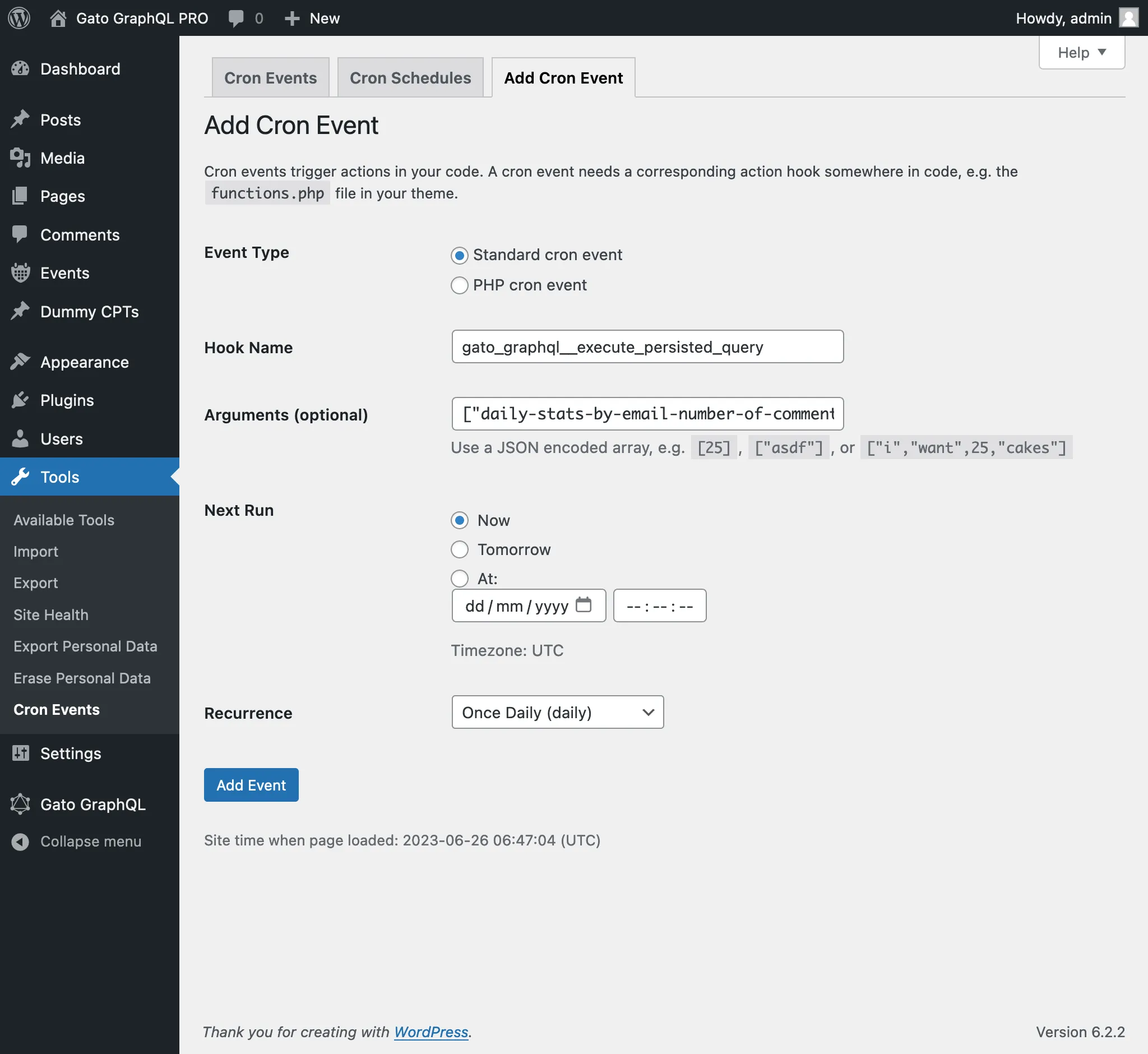
WP-Cronイベントに渡される第4引数は、GraphQLクエリを実行する際にログインしている必要があるユーザーのID(整数として)またはユーザー名(文字列として)です。
(この場合、値 1 は管理者ユーザーのIDであり、ユーザー名 "admin" を指定することもできました。)
この引数を渡すことは、mutationを実行する際に通常必要となります。これらのほとんどは、(適切な権限を持つ)ユーザーがログインしていることを必要とするためです。