


🚀 Gato GraphQL v1.2リリース(新しいPersisted Queriesを搭載)

Gato GraphQL バージョン 1.2 がリリースされました! 🎉
すべての変更内容についての説明をご覧ください。
複数の定義済みPersisted Queriesを追加
一般的な管理タスクを実行するための以下のPersisted Queriesが提供されるようになりました:
URLからコンテンツを翻訳
URLを入力として受け取り、その言語と翻訳先の言語を指定すると、このクエリはURLからコンテンツを取得し、Google Translateを使用して翻訳を実行します:
query TranslateContent(
$url: URL!
$fromLang: String!
$toLang: String!
) {
_sendHTTPRequest(input: {
url: $url,
method: GET
}) {
body
translated: body @strTranslate(
from: $fromLang
to: $toLang
)
}
}例えば、GitHubリポジトリのMarkdownファイルのURLと言語コード "es" を渡すと:
{
"url": "https://raw.githubusercontent.com/GatoGraphQL/GatoGraphQL/c870d8906ae1aec3c81acc039c53acc7aab5dff0/layers/GatoGraphQLForWP/plugins/gatographql/docs/modules/single-endpoint/en.md",
"fromLang": "en",
"toLang": "es"
}...Markdownコンテンツがスペイン語に翻訳されます:
{
"data": {
"_sendHTTPRequest": {
"body": "# Single Endpoint\n\nExecute queries against the GraphQL server through the public single endpoint.\n\nBy default the endpoint is `/graphql/`, and the path can be configured through the Settings.\n\n\n\nThe GraphQL single endpoint can be configured by assigning a Schema Configuration to it. To do this, on section \"Schema Configuration\" select the desired entry from the dropdown for \"Schema Configuration for the Single Endpoint\":\n\n<div class=\"img-width-1024\" markdown="1">\n\n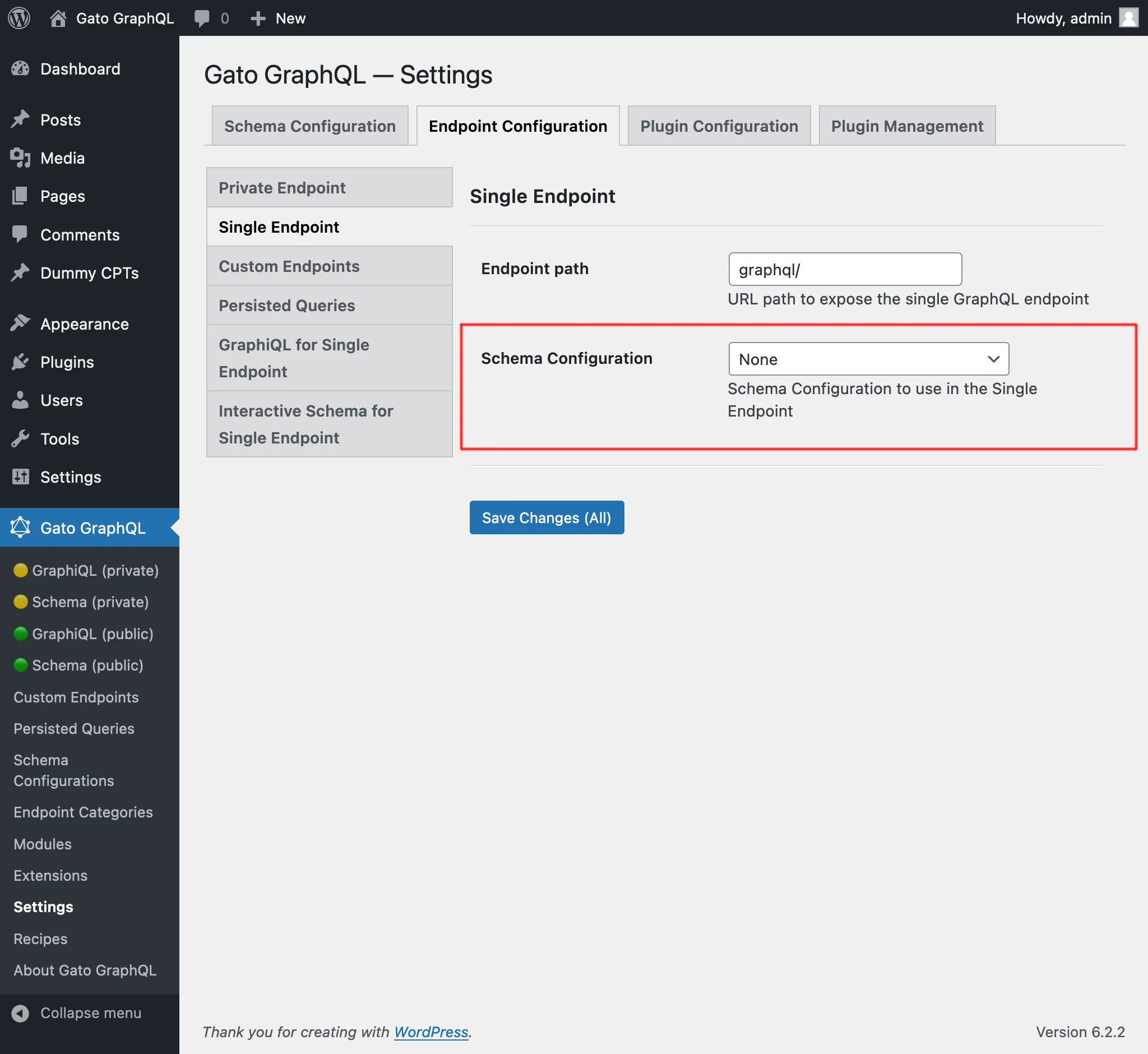\n\n</div>\n\n## Clients\n\nInteract with the single endpoint via the available clients.\n\n### GraphiQL\n\nIf module \"GraphiQL for Single Endpoint\" is enabled, then the single endpoint's GraphiQL client becomes publicly available.\n\nTo open it, click on link \"🟢 GraphiQL (public)\" on the plugin's menu:\n\n<div class=\"img-width-1024\" markdown="1">\n\n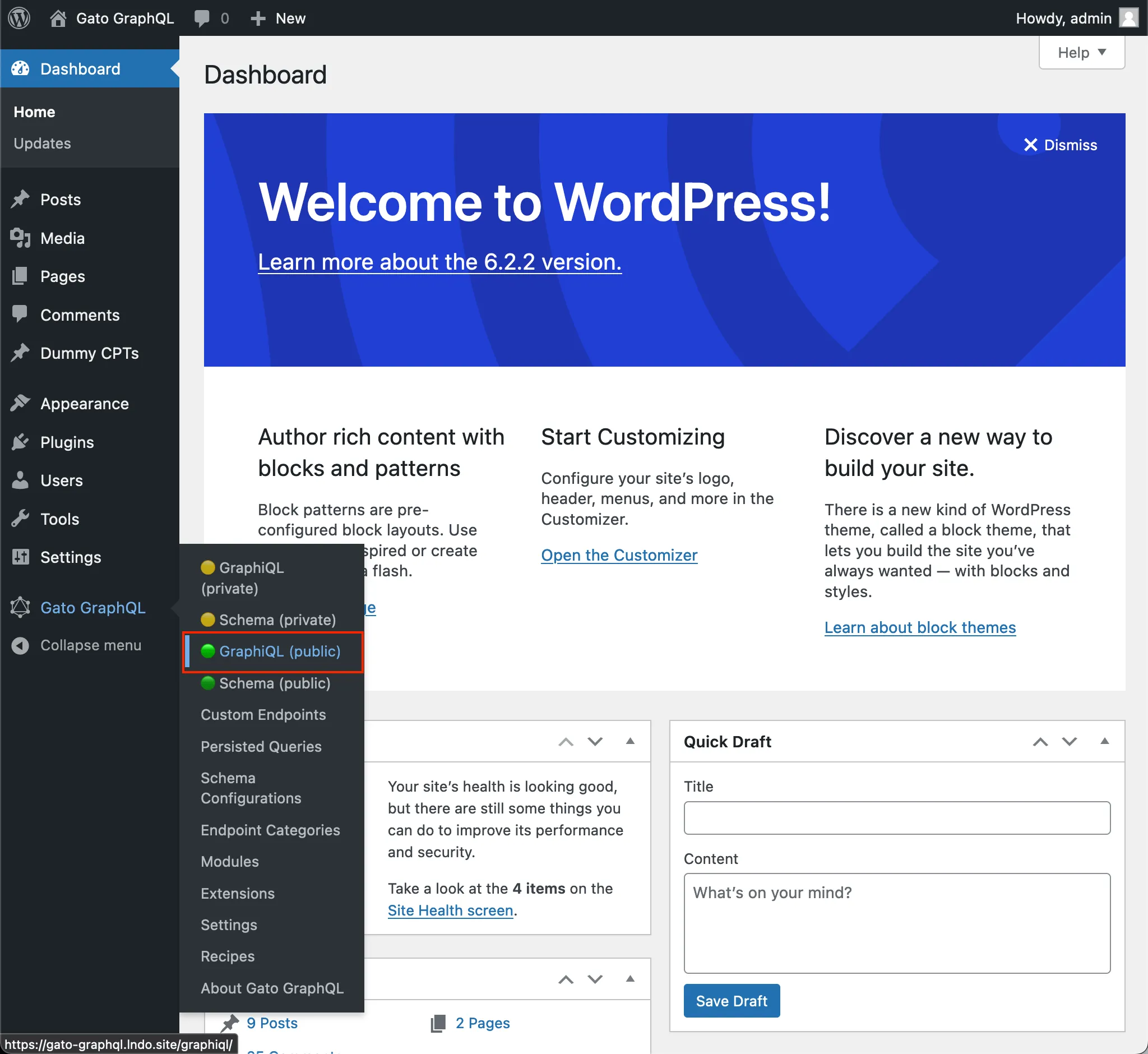\n\n</div>\n\nBy default, the client is exposed under `/graphiql/`. This path can be modified on the Settings, under tab \"GraphiQL for Single Endpoint\":\n\n<div class=\"img-width-1024\" markdown="1">\n\n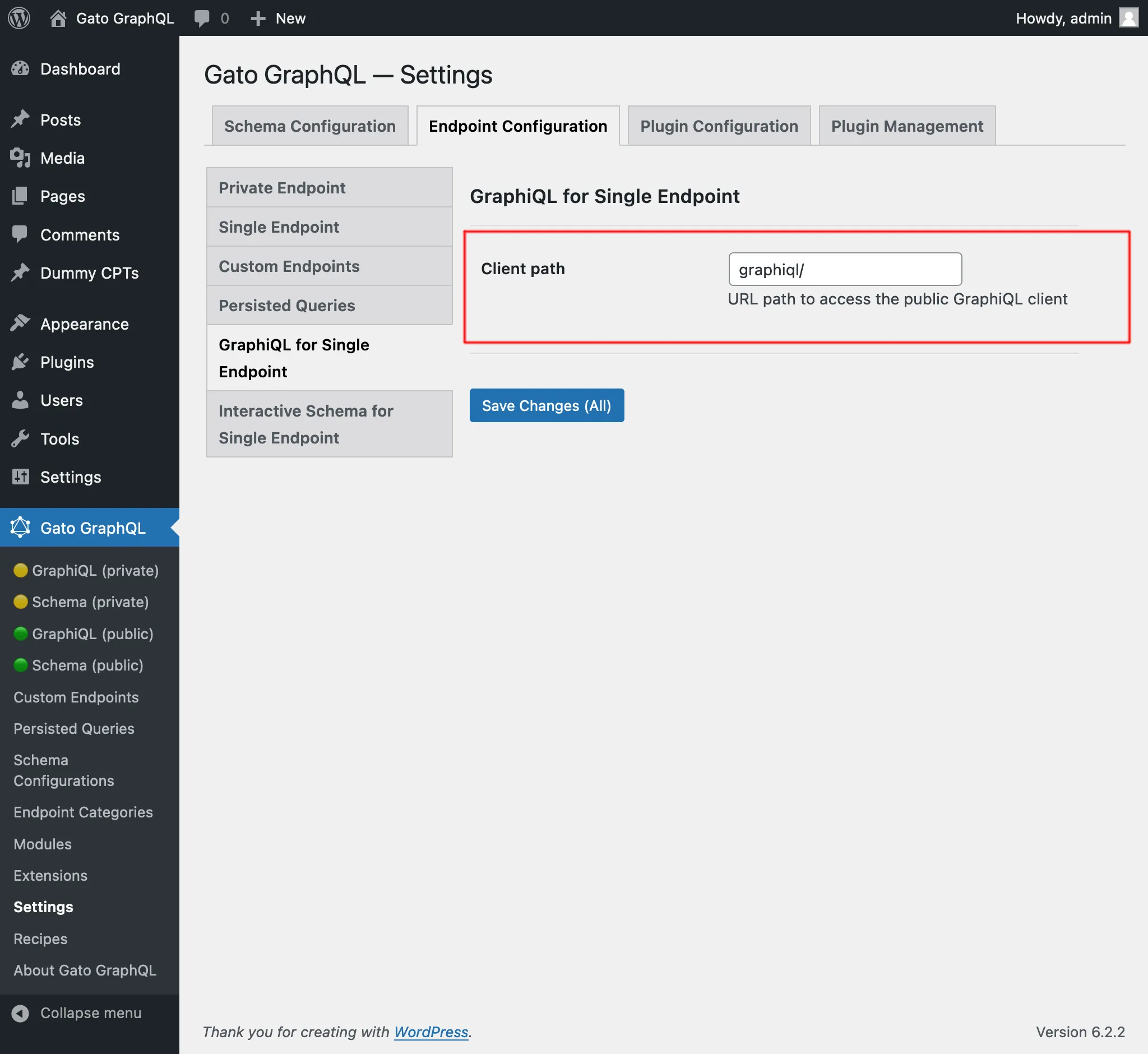\n\n</div>\n\n### Interactive Schema (Voyager)\n\nIf module \"Interactive Schema for Single Endpoint\" is enabled, then the single endpoint's Voyager client becomes publicly available.\n\nTo open it, click on link \"🟢 Schema (public)\" on the plugin's menu:\n\n<div class=\"img-width-1024\" markdown="1">\n\n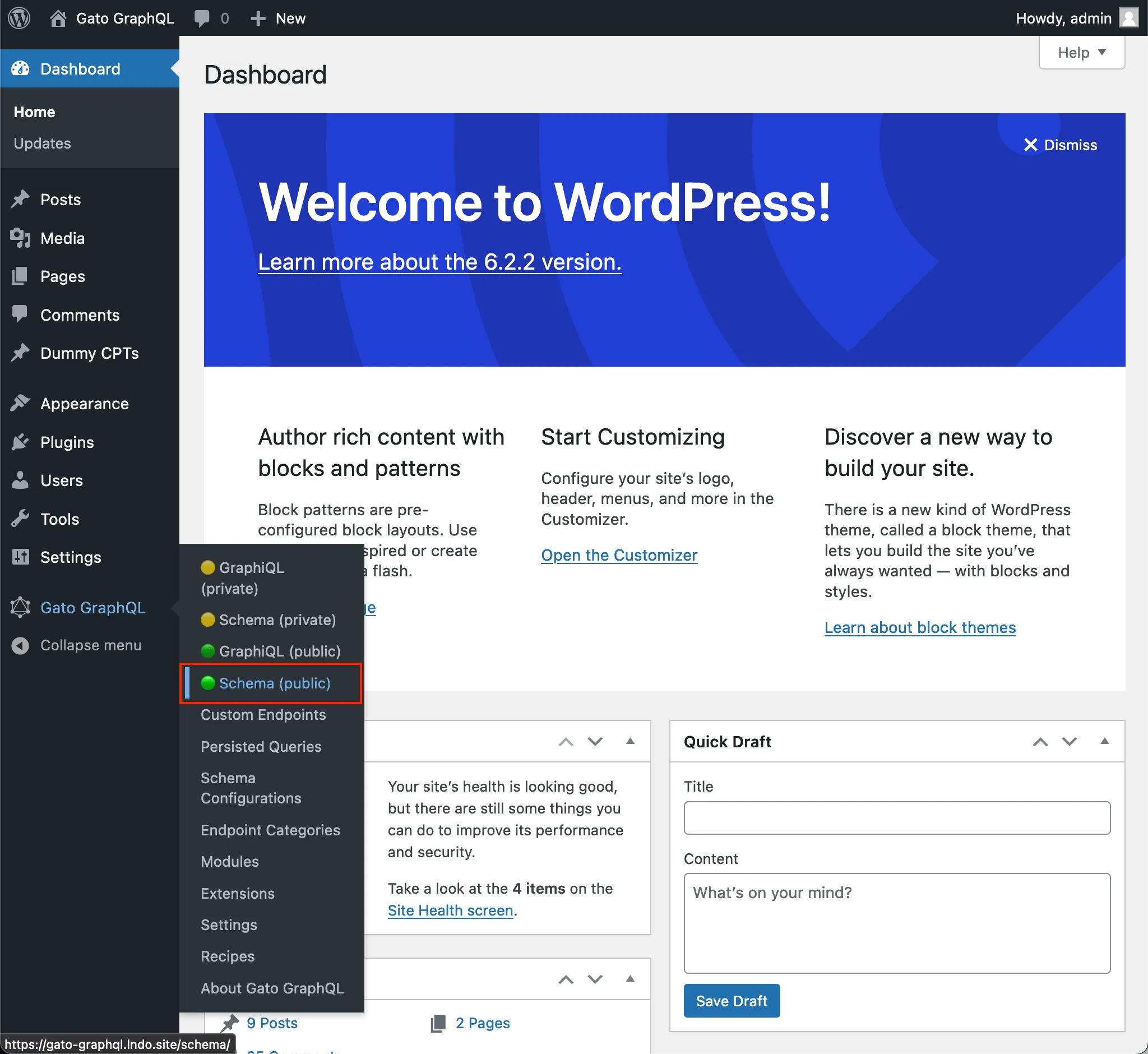\n\n</div>\n\nBy default, the client is exposed under `/schema/`. This path can be modified on the Settings, under tab \"Interactive Schema for Single Endpoint\":\n\n<div class=\"img-width-1024\" markdown="1">\n\n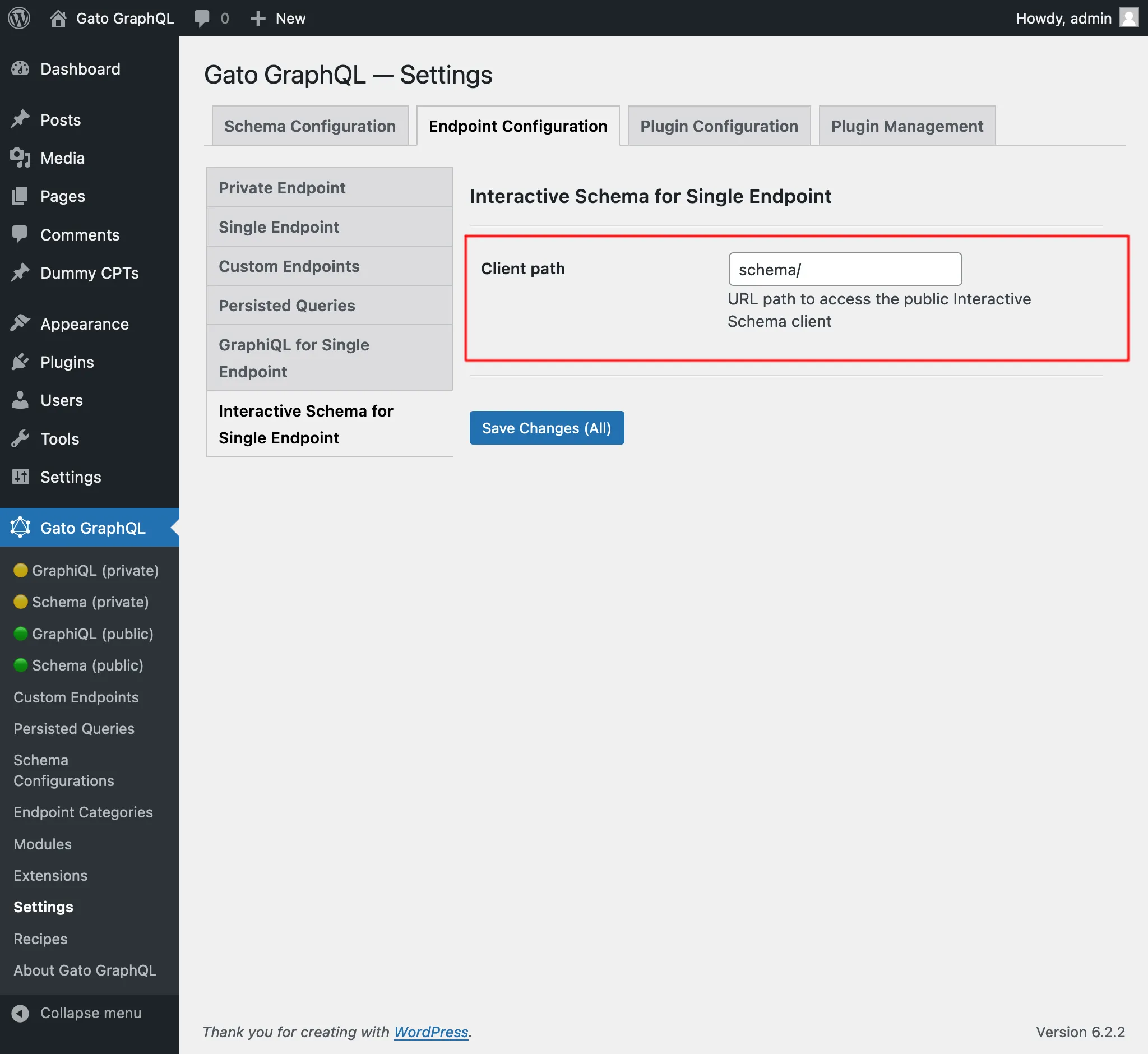\n\n</div>\n",
"translated": "# Punto final único\n\nEjecute consultas en el servidor GraphQL a través del punto final único público.\n\nDe forma predeterminada, el punto final es `/graphql/` y la ruta se puede configurar a través de Configuración.\n\n\n\nEl punto final único GraphQL se puede configurar asignándole una configuración de esquema. Para hacer esto, en la sección \"Configuración del esquema\", seleccione la entrada deseada del menú desplegable para \"Configuración del esquema para el punto final único\":\n\n<div class=\"img-width-1024\" descuento=1>\n\n\n\n</div>\n\n## Clientes\n\nInteractúe con el punto final único a través de los clientes disponibles.\n\n### GrafiQL\n\nSi el módulo \"GraphiQL para punto final único\" está habilitado, el cliente GraphiQL del punto final único estará disponible públicamente.\n\nPara abrirlo, haga clic en el enlace \"🟢 GraphiQL (público)\" en el menú del complemento:\n\n<div class=\"img-width-1024\" descuento=1>\n\n\n\n</div>\n\nDe forma predeterminada, el cliente está expuesto en `/graphiql/`. Esta ruta se puede modificar en Configuración, en la pestaña \"GraphiQL para punto final único\":\n\n<div class=\"img-width-1024\" descuento=1>\n\n\n\n</div>\n\n### Esquema interactivo (Voyager)\n\nSi el módulo \"Esquema interactivo para punto final único\" está habilitado, el cliente Voyager del punto final único estará disponible públicamente.\n\nPara abrirlo, haga clic en el enlace \"🟢 Esquema (público)\" en el menú del complemento:\n\n<div class=\"img-width-1024\" descuento=1>\n\n\n\n</div>\n\nDe forma predeterminada, el cliente está expuesto en `/schema/`. Esta ruta se puede modificar en Configuración, en la pestaña \"Esquema interactivo para punto final único\":\n\n<div class=\"img-width-1024\" descuento=1>\n\n\n\n</div>\n"
}
}
}これはRecipesセクションの「Translating content from URL」にも追加されました。
投稿を翻訳(クラシックエディター)、および投稿を一括翻訳(クラシックエディター)
すでに「Translate post」と「Translate posts」(一括)のPersisted Queriesが存在しており、これらは投稿内のGutenbergブロック内のすべてのプロパティを翻訳するものでした。
これらは適切に「Translate post (Gutenberg)」と「Translate posts (Gutenberg)」に名前が変更され、クラシックエディター向けにコンテンツを翻訳する新しいPersisted Queriesが追加されました:
- Translate post (Classic editor):1つの投稿を翻訳する
- Translate posts (Classic editor):複数の投稿を一括翻訳する
これらのクエリはすべて、Google Translate APIを呼び出してコンテンツを翻訳し、1回のリクエストですべてのデータを送信します。
例えば、「Translate posts (Classic editor)」クエリを使用して5件の投稿を翻訳する場合、5件すべての投稿のデータ(タイトル、本文、抜粋)が一括で送信されるため、豊富なコンテキストが提供され、翻訳の精度が向上します。
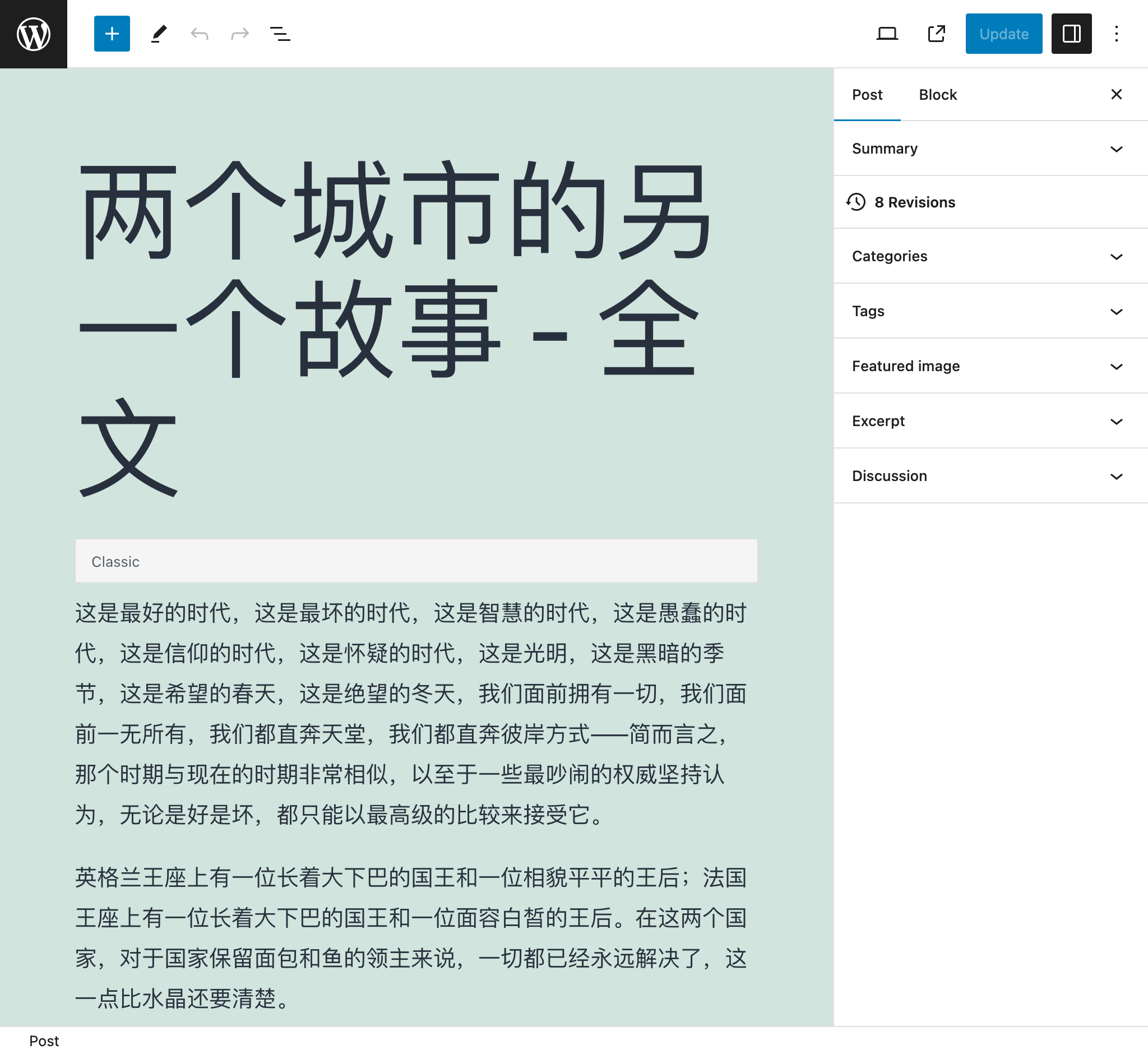
例えば、この投稿を英語から中国語に翻訳すると:
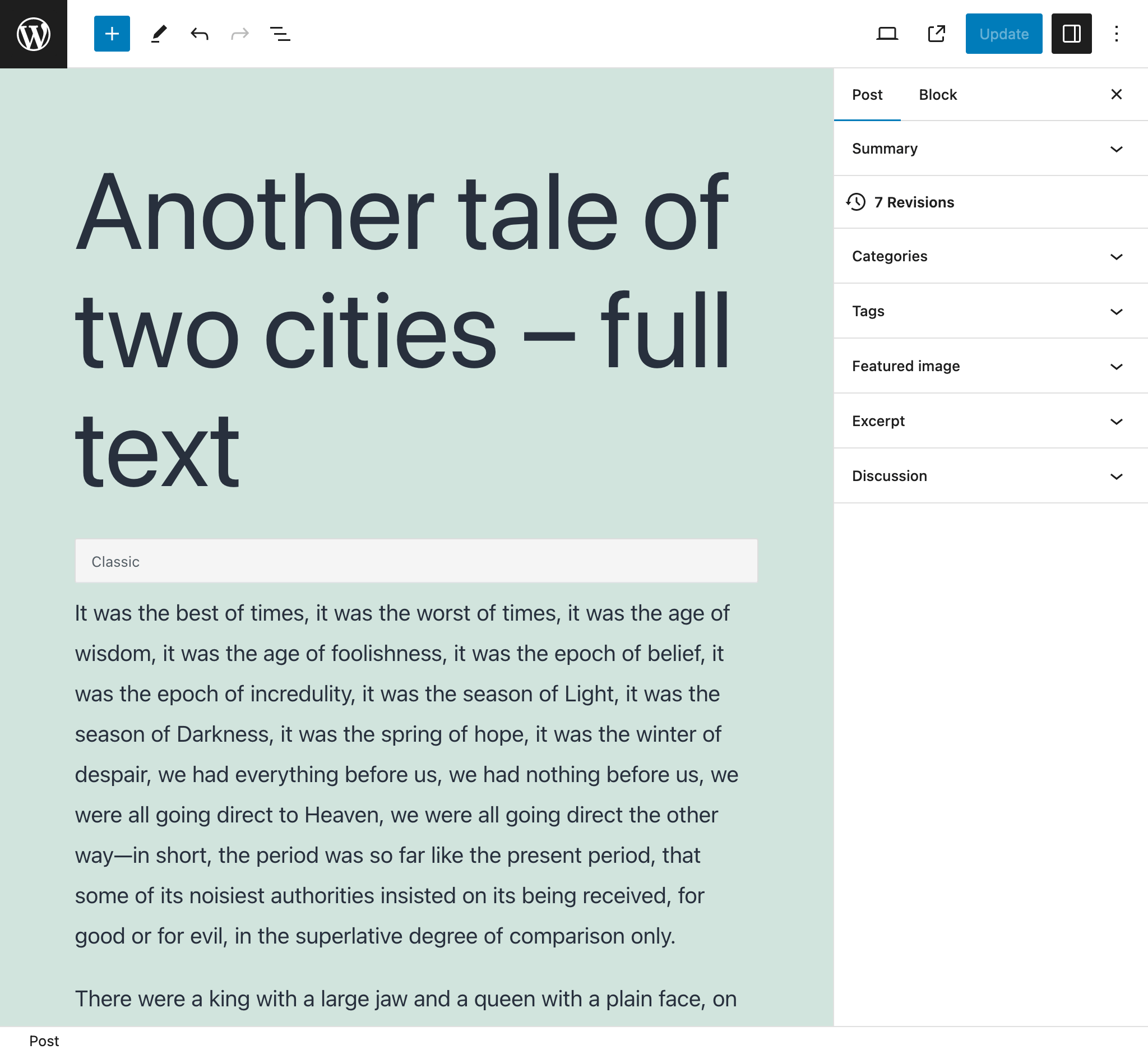
...このように変換されます:
WordPress RSSフィードから投稿をインポート
投稿のWordPress RSSフィードを指定すると、そのデータで新しい投稿が作成されます。
例えば、このクエリは1つの投稿の以下のRSSフィードを解析します(通常は https://mysite.com/post-slug/feed/rss/?withoutcomments=1 でアクセスできます):
<?xml version="1.0" encoding="UTF-8"?>
<rss version="2.0"
xmlns:content="http://purl.org/rss/1.0/modules/content/"
xmlns:wfw="http://wellformedweb.org/CommentAPI/"
xmlns:dc="http://purl.org/dc/elements/1.1/"
xmlns:atom="http://www.w3.org/2005/Atom"
xmlns:sy="http://purl.org/rss/1.0/modules/syndication/"
xmlns:slash="http://purl.org/rss/1.0/modules/slash/"
>
<channel>
<title>A tale of two cities – teaser – PoP API Demo</title>
<atom:link href="https://mysite.com/blogroll/a-tale-of-two-cities-teaser/feed/?withoutcomments=1" rel="self" type="application/rss+xml" />
<link>https://mysite.com</link>
<description>Just another WordPress site</description>
<lastBuildDate>Tue, 20 Jul 2021 23:03:59 +0000</lastBuildDate>
<language>en-US</language>
<sy:updatePeriod>hourly</sy:updatePeriod>
<sy:updateFrequency>1 </sy:updateFrequency>
<generator>https://wordpress.org/?v=6.1.1</generator>
<item>
<title>A tale of two cities – teaser</title>
<link>https://mysite.com/blogroll/a-tale-of-two-cities-teaser/</link>
<comments>https://mysite.com/blogroll/a-tale-of-two-cities-teaser/#comments</guides/query/comments>
<dc:creator>leo</dc:creator>
<pubDate>Mon, 21 Dec 2020 08:24:18 +0000</pubDate>
<category>Blogroll</category>
<category>championship</category>
<category>book</category>
<guid isPermaLink="false">https://mysite.com/?p=1657</guid>
<description></description>
<content:encoded>
<p>It was the best of times, it was the worst of times, it was the age of wisdom, it was the age of foolishness, it was the epoch of belief, it was the epoch of incredulity, it was the season of Light, it was the season of Darkness, it was the spring of hope, it was the winter of despair, we had everything before us, we had nothing before us, we were all going direct to Heaven, we were all going direct the other way—in short, the period was so far like the present period, that some of its noisiest authorities insisted on its being received, for good or for evil, in the superlative degree of comparison only.</p>
</content:encoded>
<wfw:commentRss>https://mysite.com/blogroll/a-tale-of-two-cities-teaser/feed/</wfw:commentRss>
<slash:comments>45</slash:comments>
</item>
</channel>
</rss>CSVから投稿をインポート
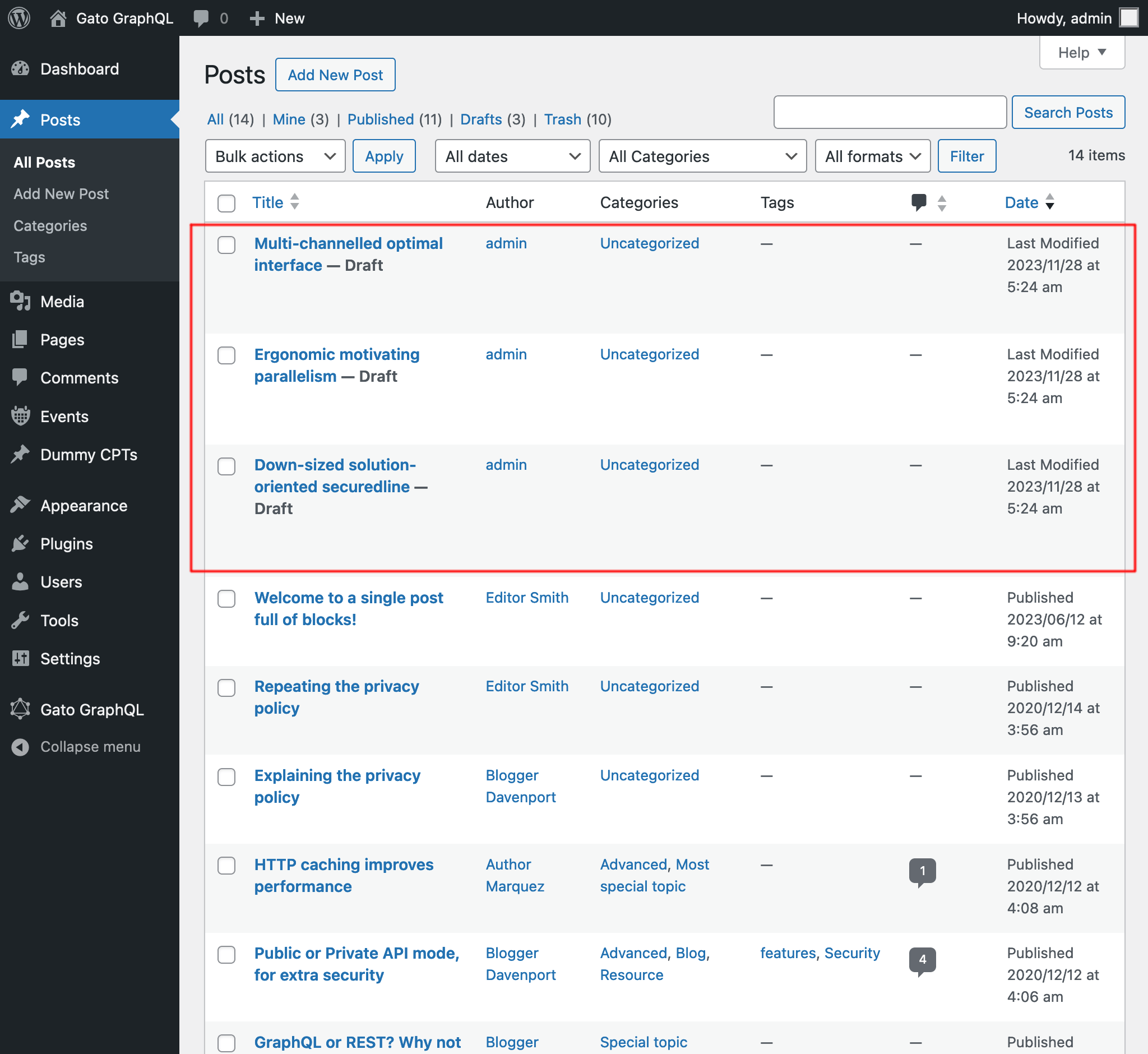
CSVを提供すると、各エントリ(タイトル、抜粋、本文、著者)に対応するデータで投稿が作成されます。
例えば、以下のCSVは3件の投稿を作成します:
Title,Excerpt,Content,Author
Multi-channelled optimal interface,Inventore iste velit et expedita ipsa dolor,"<!-- wp:paragraph -->
<p>Inventore iste velit et expedita ipsa dolor. Optio suscipit qui id harum corporis dignissimos.</p>
<!-- /wp:paragraph -->",admin
Ergonomic motivating parallelism,Consequuntur velit quasi assumenda,"<!-- wp:paragraph -->
<p>Consequuntur velit quasi assumenda. Eum non saepe est. Ut dolorem harum eveniet eaque nemo impedit. Voluptatem commodi modi sed sed animi voluptatem.</p>
<!-- /wp:paragraph -->
<!-- wp:image {""id"":5,""sizeSlug"":""large""} -->
<figure class=""wp-block-image size-large""><img src=""https://mysite.com/wp-content/uploads/2023/09/wordpress0.jpg"" alt="""" class=""wp-image-5""/></figure>
<!-- /wp:image -->
<!-- wp:image {""id"":7,""sizeSlug"":""large""} -->
<figure class=""wp-block-image size-large""><img src=""https://mysite.com/wp-content/uploads/2023/09/wordpress2.jpg"" alt="""" class=""wp-image-7""/></figure>
<!-- /wp:image -->",admin
Down-sized solution-oriented securedline,Ipsam minima qui asperiores dolorum unde voluptas quia voluptate,"<!-- wp:paragraph -->
<p>Ipsam minima qui asperiores dolorum unde voluptas quia voluptate. Incidunt omnis cumque beatae quo deleniti ex. Praesentium nihil et consectetur neque commodi tempora ipsa adipisci. Praesentium perferendis sint est.</p>
<!-- /wp:paragraph -->
<!-- wp:paragraph -->
<p>Et aut fuga aliquam consequuntur dolore sunt ut ut. Quibusdam in voluptas vitae quia eaque. Eligendi dolorum dolorem vitae et vitae et ut.</p>
<!-- /wp:paragraph -->",admin
クエリを実行すると、次の結果が得られます:
投稿のリンクを取得
すべての投稿内のすべてのリンクを検索し(すべての <a href="(...)">(...)</a> 文字列を検索)、{ href: (...), text: (...) } というプロパティを持つJSONオブジェクトとしてレスポンスに一覧表示します。
例えば、次のようなレスポンスが得られる場合があります:
{
"data": {
"posts": [
{
"id": 1435,
"title": "Citations from famous authors",
"links": [
{
"href": "https://www.azquotes.com/author/4085-Fyodor_Dostoevsky",
"text": "Quote by Fyodor Dostoevsky"
},
{
"href": "https://www.azquotes.com/author/14706-Leo_Tolstoy",
"text": "Quote by Leon Tolstoi"
},
{
"href": "https://www.azquotes.com/author/15138-Voltaire",
"text": "Quote by Voltaire"
}
]
},
{
"id": 1,
"title": "Hello world!",
"links": []
}
]
}
}XMLスカラー型を追加
新しい XML スカラー型を通じてXML文字列を入力できるようになりました。このスカラー型はXML文字列の正確性を検証します。
例えば、このクエリ:
{
_strDecodeXMLAsJSON(xml: """<?xml version="1.0" encoding="UTF-8"?>
<body>
<message>Hello world!</message>
</body>
""")
}...は次の結果を生成します:
{
"data": {
"_strDecodeXMLAsJSON": {
"message": "Hello world!"
}
}
}一方、このクエリ:
{
_strDecodeXMLAsJSON(xml: """<?xml version="1.0" encoding="UTF-8"?>
<body>
<message>Hello world!</message>
""")
}...は次の結果を生成します:
{
"errors": [
{
"message": "Cannot cast value '<?xml version=\"1.0\" encoding=\"UTF-8\"?>\n <body>\n <message>Hello world!<\/message>\n ' for type 'XML'",
"locations": [
{
"line": 2,
"column": 31
}
],
"extensions": {
"field": "_strDecodeXMLAsJSON(xml: \"<?xml version=\"1.0\" encoding=\"UTF-8\"?>\n <body>\n <message>Hello world!<\/message>\n \")",
"problems": [
"Premature end of data in tag body line 2\n"
]
}
}
],
"data": {
"_strDecodeXMLAsJSON": null
}
}ドキュメントの改善
- Helper Function Collection エクステンションの新しいフィールドに関するドキュメントを追加:
_strDecodeXMLAsJSON_strParseCSV
修正
- 定義済みPersisted Queries「Translate post」と「Translate posts」において、ブロックの
attributes.{something}プロパティを選択する際にfailIfNonExistingKeyOrPath: falseを追加(定義されていない場合があるため) - 定義済みPersisted Query「Import post from WordPress site」において、投稿を選択するためにステータス
anyを追加 - Persisted Query「Translate post」を「Translate post (Gutenberg)」に、「Translate posts」を「Translate posts (Gutenberg)」に名前を変更